Categories
How-Tos iOS & Mac how-tos Photography how-tos Pictorial

Photoblogging from the iPhone

(This was going to be a post about some iPhone photos I took at Westfield recently, but started to become an iPhone post instead! Photos at the bottom…)

So here at mge towers we’re still devoid of connection to the real world, er, I mean The Internet. My iPhone has been pushed to the limit in the meantime and has needed charging a couple of times a day! It’s still by far the most incredible gadget I’ve ever owned, despite the numerous shortcomings (copy & paste, MMS, SMS forwarding…). It’s as a ‘take everywhere’ camera that it’s been proving most useful lately, though. Here’s a little run down of the apps that get the most use when it comes to photography and blogging from my iPhone.

Categories
Editorial Other

JPG saved?

Sounds like JPG has been saved after all. I’m updating via the WordPress app for iPhone so I can’t copy and paste in the email that I just received, but the gist is that they’ve got some sort of buyer and will be able to keep the site up after all. Not sure about the magazine itself though at this stage.

Good news then!

Categories
Editorial Other

normal service will be resumed shortly!

Just a quick post to say that while I do have plans to post some more “how to…” articles, we’re in the middle of moving house at the moment so when I haven’t been celebrating the festive period or working I’ve been packing box after box with all our stuff. It’s quite incredible how many boxes we’ve filled – looking at them stack up in our front room, behind the sofa and out into the hall I can’t quite work out how we managed to accomodate it all in the first place! So stick with me folks, I haven’t given up on this little project!

In other news, I’m doing stills on a film called Vivid later on this month and at the start of February, so I might post a few iPhone shots from the set if there’s anything exciting to share.

In the meantime, thanks for swinging by!


Categories
Editorial Other

save JPG!

savejpg_logo.jpgLooks like the looming closure of JPG magazine may be postponed a little longer. Here’s an excerpt from their recent blog update:
…we are hopeful that something can be worked out with a number of potential last minute acquirers who want to help the JPG community live on. There is a lot to sort through in any case, so please be a little bit patient with us. We will do our best to keep you all informed in the mean time.

Seems the news spread round the interweb a lot quicker than they’d imagined. At least one website has sprung up to drum up support. Fingers crossed and if it manages to keep going I’ll definitely make a bigger effort to contribute!

Categories
How-Tos Photography how-tos

making ‘this glass is half full’

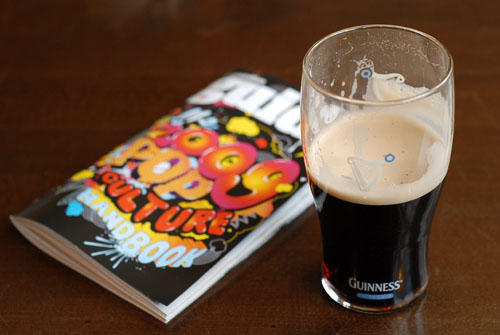
Today I posted a new image from a local pub that at the time I took it was a really nice photo as it stood. Really nice soft natural light, nice depth of field and sharpness with the 50mm f/1.8 lens, simple subject matter, popping colours, and beer. Perfect. 🙂

I did give it a little lift in Photoshop though, as I often do. I just like my images with a bit more pop or a push one way or the other. As it was a really simple few layers I used, I thought it would make for an easy explanation!

First of all, here’s the original photo straight off the card, untouched by any editing software beyond the JPG settings on board the camera:

myglasseye540_half_full ORIGINAL.jpg