Categories
iOS & Mac reviews

Star Command review: let-down in spaaaace

A long time coming, Star Command for iPhone and iPad ($2.99) is a triumph of style and ambition over sense, logic and good design. In other words: it’s pretty but I found it painful to play. My quick verdict: don’t bother, and get FTL for your iPad instead, or give the wonderfully compelling Rymdkapsel a go on your iPhone or iPad.

Basically Star Command is what would happen if you took the aims of FTL (command a starship) and rejected all the great design decisions FTL made, and crammed the result into a very pretty façade that features some of the most tedious micro-management of fiddly-to-control characters I’ve played in a while.

What’s so bad about it?


So many poor design decisions:

  • there’s no tutorial that explains how ship weapons are fired, so look forward to spending at least the first couple of battles struggling to get what you’re supposed to do. Clever stuff.
  • crew can only do one job at a time, and in order to switch their skill you have to slooooooowly march them over to the room that matches the skill you want them to have, then sloooooowly march them back to the area that requires attention. When you’re flooded with invaders and need to fight back, enjoy marching your team through the ship just for a change of wardrobe, then back to the invaders. God it’s tedious.
  • rooms that require the production of specific ammo will not just keep making that ammo for you. You have to re-initiate production after each and every unit they produce. If you forget, which it’s incredibly easy to do, you’re stuffed. Why do this?
  • the text style they chose is hideous and really hard to read. Fits the retro-look, but there’s a reason we don’t present screens of text like that any more: it’s horrible on the eyes.
  • and God help anyone attempting to play this on an iPhone. I know plenty of people are doing, but they must have the patience of a saint, or incredibly high tolerance for frustration.

And that’s before we get onto the endlessly repetitive missions (go to a planet, sit through the screens of text, enter battle. Every time. No variation), and the fact that it’s perfectly possible to just send all your crew into one room, ignore ALL the damage your ship is taking, even the hull breaches, and wait it out until you grind the enemy shields down eventually.

But hey, it LOOKS nice…

In conclusion

In my personal opinion, despite lovely(ish) presentation and a whole heap of atmosphere, it eschews sense and logic to produce a game that just throws one frustration after another at you to draw out the play-time. I’ve no issue with hard games in which dying and starting again is all part of the appeal. That’s why I love FTL.

But this is just a mess of frustrations and after a couple of games, neither of which were ever much fun, I have no desire to play any more and an overwhelming urge to fire up FTL and run a starship with proper crew who don’t have to change their jersey just to fire a phaser.

Go get FTL for your iPad, or your Mac or PC, or Rymdkapsel for iOS, and don’t waste £2 on Star Command.

Categories
iOS & Mac reviews

Radium 3: an excellent radio app for Macs, with a dumb icon

Almost all my music needs at home are satisfied by either my iTunes collection or, increasingly in recent months, my Rdio subscription, but sometimes I want to listen to the radio. TuneIn Radio, the excellent iOS app, runs for free in your desktop browser but you may prefer to use a dedicated app.

For the last few years I’ve been using Radium, by CatPig Studios ($9.99 on the Mac App Store). It’s a lightweight radio app for Macs that lives in your menu bar and with a simple interface lets you search for, play and save internet radio stations. It recently got an update to version 3, which also saw CatPig stop selling it from their site and make it a Mac App Store exclusive.

They put it on sale for the first few weeks to make up for Apple’s lack of support for discounted upgrades so I grabbed it to check out the new features.

What’s new?

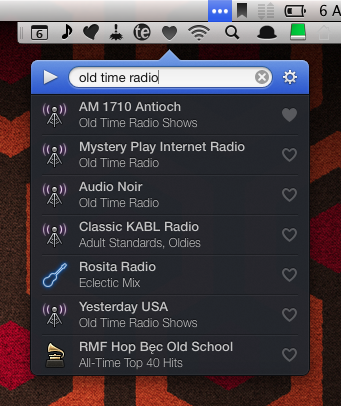
The interface has had a makeover from a rather plain blue-and-white to, well, blue-and-black, but the overall feel is much slicker. For most of the time it’s just a search bar and results/favourites list, with everything else hidden behind a gear icon.

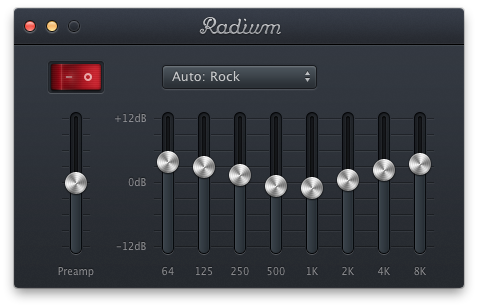
There you’ll find options to output to any Airplay receivers in the vicinity, view album art which doubles as a mini-controller, save tracks you like to a wish-list, or pop out a graphic equaliser, plus there’s support for your existing digital radio subscriptions, including K-PIG, JazzRadio.com, Live 365 and SiriusXM Canada and USA.

radium-interface

radium-mac-radio-app

Also new is the selection of icons next to stations in the list; once you save a station to your favourites you can change these to whatever you like. And of course you can tweet what you’re listening to, ‘Love’ it on Last.fm, or visit the station’s own website.

radium-custom-sorting-icons

I’ve got two stations in Radium right now – BBC Radio 6 and AM 1710 Antioch – so I really don’t need much in the way of organising or sharing. All I want is a simple, reliable radio streaming app that looks good and stays out of the way until I need it, and Radium really nails that so there’s not much more to say other than to highly recommend it.

Except… there’s this one thing…

Okay, so this really makes barely any difference to the utility of the app but it bugs the heck out of me and that’s the change of icon design. I’m going to talk about this for a fair bit now, better get the popcorn out, or skip to the end

Still here? Okay, here’s the current and old icon side by side:

radium-icons

One of those is a lovingly crafted old radio; its menubar icon is also a radio. The other is a chocolate heart and its menubar icon is also a heart.

Radium 3’s icon is the chocolate heart. Now, it’s a delicious looking chocolate I have to say. I imagine biting slowly into it and discovering a delicious chocolate goo, with perhaps a touch of Cointreau running through it… Anyway, it doesn’t strike me as a music app. I mean, why, right?

I haven’t really followed any of the marketing for Radium 3, I just saw there was an update, was confused by the icon, checked it was the same Radium, shrugged and bought it. Looking through the actual Mac App Store listing in detail, I found this:

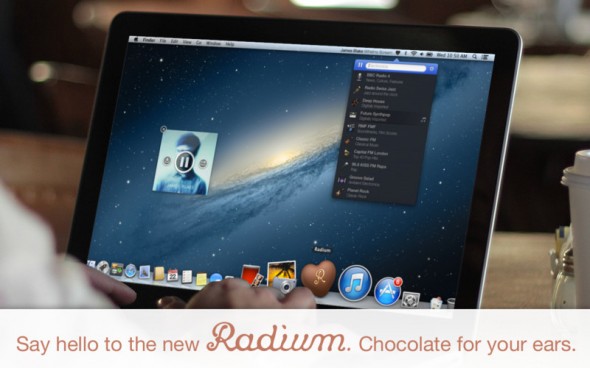
radium-catpig-assholes

So I guess that’s why it’s a chocolate now. Or did the icon come first and the slogan a result of that?

Either way, to me it feels like it’s an attempt to detach from the ‘old school’ definition of radio by making the icon less referential of the technology of yesteryear, where Radium 2’s icon was firmly rooted, and push something more conceptual and abstract.

But chocolate for my ears? Well, that’s just unhygienic, who even puts chocolate in their ears while listening to music? Why would you do that? Or even encourage it? Wouldn’t it have to be melted and therefore hot? It’s very confusing.

I’m being ridiculous to make a point; I’m very curious how they came to this decision as the permanent representation of the app for the future because it’s so far away from anything I’d choose, and I have an annoying need to understand whyyy. I think I know why, I just don’t understand it. Or… agree with it. I talked to CatPig about it over Twitter but they prefer to insult people who don’t “get it”. Rude, unprofessional, immature… yep, they’re all those things, but their app is good and that’s what I’m recommending, not their lack of inter-personal skills.

Heart icon, I heart you not

The new icon design extends to the menubar, where Radium is also a heart. I tuck most of my menubar icons away with Bartender, and when I’m up there I don’t want to have to think about which is which, which is usually fine because they’re all pretty descriptive.

radium-menubar-icon

Look, there’s Alfred’s bowler hat and Hazel’s feather duster, both apt for those apps; TextExpander uses its ‘balloon’ icon and also has the decency to offer a choice; Droplr, Airfoil, Fantastical and Dropbox are also pretty self-explanatory. In fact most everything up there is.

It’s really just Skitch and Radium letting the side down, and what do they both have in common?

So does anyone know an easy way to hack the menubar icon out of Radium 2 and apply it to Radium 3? Because until then some irritably logical perfectionist side of me won’t be happy.

In conclusion

Radium 3, the app, is excellent. The icon concept is… different, and the devs really believe in it, but if you’re not as fussed as me about that sort of detail (and I suspect I’m outnumbered 😉 ) and you’re looking for internet radio on your Mac, this is the one to look at first.

mac-app-store-availableVersion 3 of Radium, the most delicious radio-streaming chocolate you’ll ever put in your, um, ears is available on the Mac App Store for $9.99 via that handy button over there.

P.S. – a word about Antioch

Just another quick mention for AM 1710 Antioch again – it’s a fantastic little station run by this one guy who’s got loads of recordings of radio dramas and comedies going way back to the 30s – including Jack Benny, Abbott and Costello, Superman, The Whistler, The Lone Ranger and more, and often featuring the actual adverts for cigarettes and Kraft cheese products.

They play on an automated system that tries to match for the date so you’re usually listening to something that originally aired that day many decades ago. I love it and recommend it for a historical and entertaining listen.

Categories
iOS & Mac reviews

Nimble Quest: a freemium game I don’t hate

Remember that mobile game, Snake? Of course you do; for a time it was probably up there with Tetris and MineSweeper as one of the most-played games in the world, especially if you owned a Nokia mobile phone, a fact knowingly referenced in the tutorial of the very game I’m about to review…

Nimble Quest (iOS App Store, Free; Mac App Store, Free) is what happens when you take Snake and stick it through a blender set to ‘SNES-era RPG’, and it’s almost the best Snake game ever.

Wait – “almost”?

Well, Nimble Quest just happens to be the latest twin-currency freemium game, which means the gameplay is skewed against your unfettered enjoyment of it one way or another right from the start. The question is, does the Awesome outweigh the Sucky?

(SPOILER: yes, just about…)
nimble-quest-review

To battle!

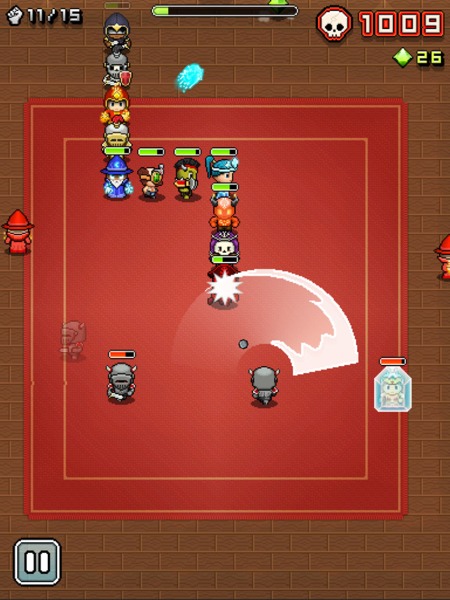
In Nimble Quest your snake is actually a conga-line of heroes ranging from warriors to wizards and everything in between; enemies are similarly themed characters which drop power-ups as you vanquish them; the arenas cover locations like sewers, graveyards and castle courtyards; and it’s all presented in 16-bit style graphics, much like the last two NimbleBit’s releases, Pocket Planes and Tiny Tower.
nimble-quest-freemium-0

Selecting a hero to lead the line, from an initial choice of three, you swipe to turn as he or she marches around the map. As you approach enemies your hero opens fire automatically, and if the enemy ‘drops’ a new hero as they die they’re added to your chain when you march over them. The new hero will then be available to select as a leader in your next game, and each hero has their own strengths and weaknesses so you’ll need to experiment to discover which heroes work best in the lead.

As you stomp around the arena enemies with their own unique skills and weapons will attack your heroes whenever they’re in range. Each completed arena showers you with Gems, and completing a previously un-reached arena unlocks a new type of hero and extends the maximum length of your chain. Meanwhile those enemies get stronger and swarm more heavily, and you’ll start learning tactics to protect your lead hero and expose the enemies to the widest variety of attacks, particularly once enemy healers start showing up.

And it does get tough. I reckon most people will really feel the pressure by level 8 or 9, where the swarms of enemy conga-lines seem endless and require constant avoidance. And every time you die, at the hands of an enemy attack or by piling your leader into a wall, an enemy or your own chain of heroes, you have to start back at Level 1 with just one hero in your chain, unless you spend a Token to retry that level.

nimble-quest-freemium-2

This is one of those games where you’re inevitably going to die – it’s just a matter of how soon – but by levelling up your heroes and purchasing power-ups to take in with you, your team will get further and further each time. Every death is an opportunity to tweak the team, pick a new leader and head back in for more and in that respect it’s quite similar to a ‘Rogue-like’, a style of adventure game that’s never the same twice and is designed to be played over and over.

Experience is only earned by the hero playing Leader, although the skills they learn are used no matter where in the chain they appear. Levelling up can also be bought with Gems which are reasonably plentiful within the game but, again, also available to purchase as IAPs. So although certain heroes are not ideally suited to the lead position (too slow, too lightly armoured), it’s worth levelling them all up at least once as soon as possible as the extra power they bring starts to pay off in those later arenas that once proved too much for your merry gang.

This time it’s The Real Thing

All in all, it’s a solid package, and for me it’s NimbleBit’s best yet as it’s quite simply a Proper Game. I’ve played their last three games and while each was an improvement over the predecessor, none of them have been particularly ‘gamey’ if you looked too closely:

  • Pocket Frogs was diverting for a few moments but ultimately I just didn’t care about collecting pretend frogs that didn’t do anything besides cross-breed at your whim;
  • Tiny Tower was delightfully charming in its presentation with a lot to occupy your prods and pokes, but before long it boiled down to the same old freemium pay-indefinitely-to-remove-ridiculous-timers mechanic with not a whole lot else going on in those cute little tower blocks;
  • Pocket Planes added a considerable dollop of strategy and medium-term purpose to the same mechanic, but over time its lack of a single over-reaching goal made me start to feel I was wasting my life on it for no real reason, as compelling as the desire to build the next biggest airplane was; read my review of Pocket planes here.

But Nimble Quest replaces the ‘gotta catch ’em all’ mechanic the last three favoured with a traditional score-based gaming model – level up, get further, score higher – and an online mode in which you can join clans and compete in daily challenges to win prizes and power-ups (try #TOUCHARCADE to join readers of the popular iOS games forum).

This simple fact – it’s a Proper Game – is why it’s still on my iPad despite the currency-based IAPs lurking in the background.

One more play! Next time I won’t double-turn back in on my own heroes, and I’ll definitely get to the next level! Argh, dead again, next time I’ll use a stronger hero at the front… one… more… play…

So, about those IAPs

I read a thread in the SomethingAwful forums in which it’s claimed you could fully level up a hero from zero stars to three stars in around 20 games with that hero in the lead. I suspect that might be a conservative figure; the first star can definitely be earned with just a few games in the lead, but the next requires a hell of a lot more EXP – I played three games in a row to Arena 9 with a one-star hero and the EXP bar increased by less than a tenth. And there’s at least a dozen heroes to unlock and level up.

nimble-quest-freemium-1

So the alternative is to buy the next level in Gems, and although the price for the first star is highly affordable you should probably try and save that cash for later as buying the second star costs around 10,000 Gems.

Without IAPs I was collecting about 1,500 Gems getting as far as Arena 9, so that’s six or seven good runs per hero to get their second star, and of course the price drops a little as they earn EXP. However, your third star will set you back a lot more and bear in mind you can also spend Gems on upgrades to the various power-ups that drop so that’s going to eat into your ol’ bank balance there, and so eventually you begin to think about considering looking at those IAPs…

But a freemium game always has two currencies, and Nimble Quest’s second is the Token. These drop very rarely, maybe once or twice every five or six arenas. They’re used to purchase power-ups that last your entire next game, to retry arenas when you die, add random heroes to your conga-line before the next arena, that sort of thing. Usually the cost is just one Token, but repeated retries of the same arena cost double the last amount, so be careful.

You start with ten Tokens and by not going nuts on retries unless I was on a particularly good run, making only occasional use of the health and attack-speed power-up purchases, and keeping my eyes peeled for Tokens in-game I’m still not quite out of stock, but I really have to think carefully before spending one as they’re too infrequent.

nimble-quest-freemium-IAPs

So what’s on offer in the IAP screen? You can buy packs of just Gems, just Tokens, or a mixture of both, and the tariffs within each category are a little odd, at 99¢, $4.99 and then a huge leap up to $19.99.

For my money if you were going to get an IAP the $4.99 mixed pack offers 180,000 Gems and 120 Tokens which should easily be enough to put together a nice strong line-up of heroes with plenty of retries and power-up options, making progress much less of a grind.

Alternatively, or additionally, there’s a one-time unlock of Red Gems which offer ten times the value of a standard Green Gem (or twice the value of a Blue). This gives your Gem balance after each run a considerable boost making it much easier to level your characters by paying, and doesn’t leave you with that unpleasant wallet-gouging sensation when your purchased Gems and Tokens inevitably run out.

There’s no denying that like all the most hateful most traditional freemium games, the mechanics have been skewed against the player so they’ll consider an IAP sooner rather than later. The question is to what extent it bothers you in this particular game.

There’s none of the annoying timers that plague Real Racing 3, The Blockheads, and other could-have-been-great games that decided it would be a Really Good Idea to perpetually annoy their players – instead Nimble Quest freely hands out the currency in-game but is, shall we say economical with it, making it a question of how much time you want to spend replaying the early arenas until you’re strong enough to progress, as opposed to how long you’re prepared to do something else entirely while a timer counts down.

And now, a short rant about freemium

The only freemium I don’t have any problem with is the kind that gives away part of the game – the first 3 arenas, for example – and puts the rest behind an IAP that reflects a decent one-time price for the game. But even so, Nimble Quest hands out enough Gems and Tokens that with some skill and persistence most people could probably get more than enough fun out of the game for the ridiculous asking price of FREE and have nothing to complain about, and a purchase of $4.99, a fair price for a casual game of this quality, would unlock enough Gems and Tokens that they could feasibly tire of the game itself before they spend them all.

The problem I have is, I am one of those weird, rare App Store users who doesn’t have a problem paying a fair, single price for a good app. I want to support the developer, but I hate the notion that I’m buying an expendable, entirely arbitrary ‘resource’ that I’ll have to keep buying if I enjoy and want to keep playing the game, which is why the only purchase I’ve made is the Red Gem unlock, and yet I still feel I’m being driven towards the IAPs as it’s still a grind.

nimble-quest-freemium-4

If NimbleBit make the currency drops too frequent they won’t make any money from their only income stream, IAPs, and be left in a similar position to the developers of the beleaguered Punch Quest, a freemium game which also included currency and power-up IAPs but gave so much currency away in-game that barely anybody bought the IAPs and it nearly killed their company.

Then again, that’s the whole point of freemium, that most people will put up with the arbitrary frustrations, but a small percentage (known as ‘whales’) will pour enough money into the IAPs that the developer makes enough income to cover all of the freeloaders. By making the app free that small percentage can easily swell to a significant number as free apps attract an exponentially higher number of downloads. To take just one example, read this Gamesbrief article from 2010 to see how well IAPs performed in NimbleBit’s own Pocket Frogs, or this PocketGamer article from 2012 that looks at how much money high-priced IAPs can bring in for a developer.

Unfortunately, thanks to the race-to-the-bottom pricing which was, I believe, originally driven by the poor discoverability on the App Store which meant that getting onto the Top 50 charts was the only sure-fire way to get decent exposure on the App Store, there is now a mass-market expectation of low prices, and ideally no price, and a fascinating seam of outrage is always bubbling up somewhere on the internet over the ‘greed’ of developers asking more than a dollar for their hard work. It is to this culture of expectation that we owe the freemium phenomenon’s current prominence on the App Store.

(I originally wrote "the freemium phenomenon’s undeniable success of the App Store" but I realised that really, it isn’t much of a success objectively-speaking; customers demand free, which isn’t sustainable, so developers are forced to sustain free by adding IAPs, which necessitates the arbitrary breaking of their game in order to annoy enough people to pay to remove the annoyance, while the casual market continue to freeload; the high downloads and statistical likelihood of netting a few whales sustains the belief that freemium is the way to go, which leads wankers at EA to say things like "the market has spoken and it loves freemium" when in fact the market is these days left with little choice but freemium.

But I digress…)

However, Nimble Quest has two things in its favour in the freemium argument: that grinding for Gems by just playing the game is a fairly effortless task insofar as, well, that’s the game, and it’s therefore far less of a chore than, say, hunting for time crystals in the Blockheads; also, the offer of the one-time Red Gem unlock to permanently boost your Gem gathering. These make the optional packages of currency less of a slap in the face for someone enjoying the game, plus, the price of that Red Gem unlock ($4.99) is very fair if it’s the only thing you buy. If you’re enjoying the game I think you’ll want it anyway.

Play on all your Apple devices, sync on none

Nimble Quest is on the Mac App Store as well as the iPhone and iPad, and it plays well on all three. It’s the perfect iPhone game in much the same way as Snake was the perfect Nokia game 20 years ago, but the screen is a little small so you often obscure a bit of the action with your swipes.

On the iPad it’s a delight as there’s much more space to swipe around, and while it’s not the sort of thing I tend to play on my Mac, it’s exactly the same game assigned to the arrow keys, giving that little bit more precision to the controls if you want that.

nimble-quest-freemium-mac

But thanks to the unreliability of iCloud, NimbleBit haven’t added any form of save-game syncing or backup between different versions. That means if you spend the day on your iPhone heroes but get home and want to pick up on your iPad from where you left off on the iPhone, you can’t – your iPad heroes live completely separate lives, as do your Mac heroes.

In a SomethingAwful forum thread a chap called empiremonkey who appears to work at NimbleBit posted in response to a question about device syncing:

Sorry but nope. Our experience with iCloud was interesting and we are not ready to try it again.

And when asked if other services like Dropbox could be used instead:

… once you get into requiring the player to turn it on or popup a 3rd party login screen the uptake will drop off dramatically and you can actually push people away from the game. That and if someone only uses a service with your games and actually signs up with it in your game you now become the expected place of support for everything about that service including all login issues.

Over at the Touch Arcade forums, NimbleTim from NimbleBit posted the following:

iCloud support in Pocket Planes was an interesting experience. Because of that we don’t have plans to support it in Nimble Quest right now. However I will not say it is off the table permanently.

iCloud’s notorious unreliability has been a recent bone of contention in the iOS and Mac development community but if the only option available for save-game syncing doesn’t work reliably, it’s hardly NimbleBit’s fault. I started on the iPad and put a lot of time in on it before realising my iPhone would start over, which is a shame as it’s a perfect iPhone game, but I don’t have time to waste grinding two sets of heroes up to scratch.

In conclusion

Nimble Quest is a freemium game done about as affordably as you could hope for in the era of hateful timer-based freemium ‘games’, although that doesn’t change the fact that the Gem and Token drops have been arbitrarily crippled to drive as many people as possible to purchase expendable IAPs, which almost ruins the whole thing. If you attempt to avoid paying for currency, which is certainly possible, you’ll probably feel the grind starting to chip away at the fun once you get all your heroes up to One Star.

But it’s still a great twist on a classic game that I had never considered could be refreshed in such an endearing way, and the fact that it’s perfectly possible to play without dropping a cent on the expendable IAPs will probably make it all the more successful in terms of downloads.

If you’re enjoying it, even if you’re against currency-based IAPs like me, consider a one-time purchase of the Red Gems, or the $4.99 Gems & Tokens pack, as that’s the price the game would be worth on it’s own, then get on with playing what’s almost the best Snake game ever.

app-store-availablemac-app-store-availablePick it up from the iOS and Mac App Stores using these handy buttons.

(P.S. I still hate freemium, and would like to urge you all to stop ignoring great games that ask a single, one-time purchase price of more than a couple of dollars!)

Categories
iOS & Mac how-tos iOS & Mac reviews

How to add text to Instagram photos with Over (and Photolettering)

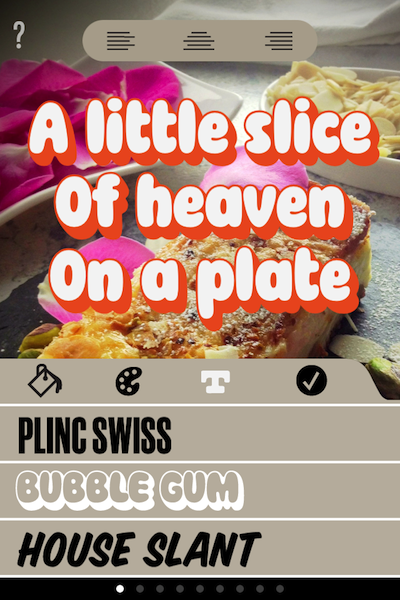
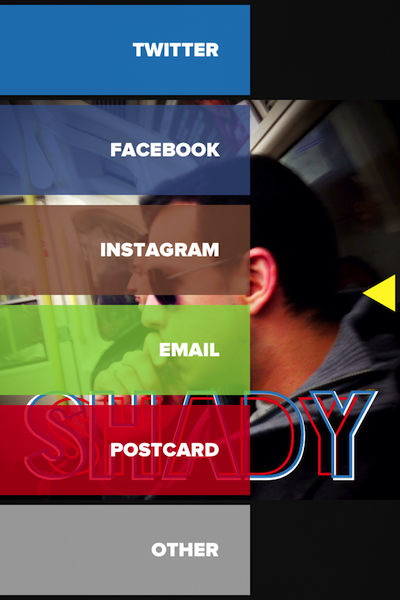
Instagram text 06Recently I’ve often found myself wanting to add a bit of amusing or descriptive text to a photo I’m tweeting, sending to friends or posting to Instagram. Of course, there’s no option to add text to Instagram photos within the app itself, so you’ll need to look to other apps.

I did a little asking around and two apps came back in recommendations so I gave them both a good go. After a few short bouts there was a conclusive winner, which I will now present to you by employing an over-stretched boxing metaphor:

The Contenders

In the Red Corner, suggested by friends, we have Over ($1.99), a Universal app which includes 30 eyecatching and fun fonts and offers dozens (and dozens!) more ‘standard’ fonts for a single in-app-purchase of 99c. To be fair, you can easily do without these as the ones included are great.

In the Blue Corner, recommended by no less than John Gruber amongst others, we have Photolettering (Free), an iPhone-only app which offers 3 fonts at first, with 20 more fonts available to purchase for 99c each, or $9.99 for all 20. The complete set is comparable in style and diversity to those included in Over.

Round one – value for money

On this basis Over clearly wins. Photolettering might be free but buying its full complement of fonts will run to five times the price of Over’s basic cost, and Over still has more choice. Furthermore, the three basic fonts it comes with are pretty bland.

It could be that for what Photolettering is offering, their ‘buy everything’ price is more realistic and fair to both them and the customer, and I’m all for that. But Over offers considerably more variety for the same price Photolettering charges for just two extra fonts, let alone Over’s vast range of standard fonts included in the single in-app purchase available.

A selection of Over's thirty available fonts The three fonts that come free with Photolettering

Round two – functionality

This is more evenly matched with each app offering some unique features, as well as the usual standards they both share such as social sharing, and a postcard function via Sincerely.

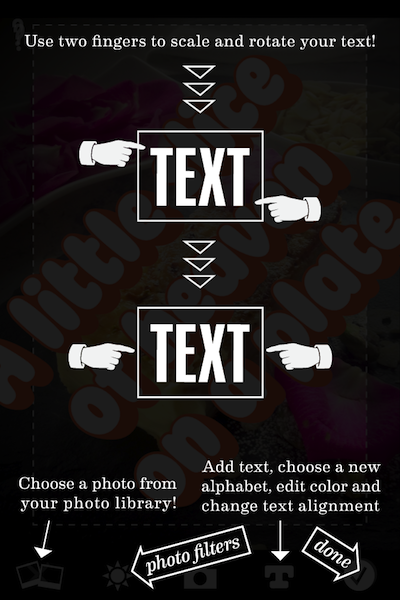
On the ‘unique feature’ front, Photolettering lets you rotate text easily using two fingers, something Over doesn’t offer at all. It also offers several two-tone fonts and control over each colour, background colours (if you don’t want to use a photo), and a choice of three basic filters which amount to Sepia, B&W, and Vivid.

On the other hand, Over offers multiple layers of text, meaning you can place several different text elements on your photo and style each one differently. It also includes a crop tool which only has one shape – square – but is perfect for setting up an image for Instagram, and the ability to darken the background photo to give your text some pop.

Photolettering has a crop tool, but only at the end of the process, and only if you decide to send to Instagram, so if you’re wanting to post it you need to plan for that as you add your text.

If you try to load in a pre-squared image, add lettering and then post to Instagram, Photolettering still forces you to crop a portrait-shaped image out of it, then add the text, then crop a square image out of that. You can avoid this by pinching the square image size to fit into the portrait crop, but the whole process is pretty ridiculous compared to how Over offers the same tool.

The sharing screen in Over A tutorial screen in Photolettering

Round three – experience

Okay, ‘experience’ is a little fancy-sounding, but that’s what we love about apps, right? How fun, easy, intuitive, and satisfying they are to fiddle with?

Photolettering is by far the plainest app, both in presentation and workflow, with one text layer and a simple tab-based navigation. It’s functional, it gets the job done – and you can rotate text, which is cool, but the whole cropping/Instagram process it uses is pretty dumb.

Over is much more stylish with a slick dial-based navigation and semi-transparent menu overlays. The dial can be a little disorienting at first, and they waste ‘More’ on an advert page for other apps, but the overall effect was more compelling.

But Over clearly wins the round with multiple layers that let you give every word its own font, position and colour, or create interesting effects by overlaying – something that works particularly well with the Blackout Sunrise font, and more than makes up for its lack of two-tone fonts.

Instagram text 06

Instagram text 01

The Winner

It wasn’t really a fair fight, was it? Over very clearly takes the crown for me. The only thing I’d nick from Photolettering is rotating text which sounds like a very update-friendly feature to me, hint hint.

So for all your text-on-iPhone-photo fun, my hearty recommendation would be to check out Over ($1.99) on the App Store.

Thanks for reading!

Categories
iOS & Mac reviews

Bartender: tidy up your Mac menu bar

Bartender, by Surtees Studios, is a natty wee Mac menu bar app that whisks up some or all of the clutter over on the right hand side of your menu bar and keeps it hidden away behind an icon of your choice. It’s perfect for keeping in check all those handy third party apps that put an icon up there, and can even manage the system items like the Airport, Date & Time, Bluetooth and Notification Centre menus.

For example, without Bartender my menu bar looks like this:

mac-menu-bar

With Bartender running I can reduce all of that to just one icon:

mac-menu-bar-tidy

Or I can tweak the settings to keep the most essential icons visible, like this:

mac-menu-bar-organizer

The app comes with a selection of icons to choose from, or you can create and use your own. Clicking the icon brings up another row containing all your other menu items, and clicking on one of those brings up it’s menu, like so:

mac-menu-bar-manager

The settings screen contains all the menu item appearance controls:

mac-menu-bar-icon-hide

Select each menu item, select where you want it to live, and that’s all there is to it; it’s that simple.

Bartender is in beta right now and available for free from their website. Once it’s out of beta you’ll have to buy a license to update to the final version but if you buy one while it’s still in beta it’s half price, less than £5.

Being in beta also means you shouldn’t be surprised to maybe find a bug here or there, but the big ones have all been ironed out and the most recent builds are perfectly stable. I highly recommend you pick it up and get some calm back in your menu bar.

And now, an insight into how my brain works

I tried turning off both Notification Centre and Spotlight, so the Date & Time is right up against the right edge of the screen and I didn’t like it, it felt unbalanced and ugly. I’m used to the clock being snuggled up next to the pleasingly angled Spotlight magnifying glass but since I got Alfred I rarely use Spotlight, and certainly never invoke it by clicking the icon, appealing as it is.

I had originally taken Notification Centre out too because the gesture is more intuitive and faster for me and I didn’t want unused icons up there. But, aesthetics are winning the battle and as I can’t (yet?) shift one of the other icons over there manually, I’ve reinstated Notification Centre for the balance.

I’ll probably change back to the Spotlight icon in the end, it just feels better…

Thanks for reading!