Categories
iOS & Mac how-tos

How to sync Mac XCOM saved games using Dropbox

UPDATE: XCOM is now available on Steam for Macs, but beware – it’s not the Elite Edition. You can buy the standard edition and the relevant DLC from Steam but at regular prices it’s cheaper to just buy the Elite Edition elsewhere. If you want to sync your saves over Steam, that’s the version to buy. If you’re using the non-Steam version, read on 🙂

ORIGINAL STORY: XCOM: Enemy Unknown – Elite Edition for the Mac ($50 on the Mac App Store) is not available on Steam and doesn’t use iCloud so there’s no way to sync your saved games between multiple computers running XCOM. Don’t despair! Here’s how you can use a free Dropbox account to do just that.

First off, this is all much easier if you install the Symbolic Link service I wrote about in this post, otherwise you need to use the Terminal command line. If you know how to create symbolic links in the command line and prefer that method, go for it, but this tutorial assumes you’ve installed the symlink tool available here.

You’ll also need a Dropbox account with a few MB free to store the XCOM SaveData folder. If you don’t have one, a basic free account is all you need and you can even get a bit of extra storage by signing up via my links.

Locate the Mac XCOM saved games

First, choose the computer which contains your ‘master’ saves, the ones you want to sync to other machines. They are stored in the Application Support folder, which lives in the user’s Library folder, which is hidden by default. To open it, in the Finder select the Go menu, then hold down Alt and select the Library item which appears. Now navigate to Application Support -> Feral Interactive -> XCOM Enemy Unknown – Elite Edition’.

Alternatively, from the Finder type Command-Shift-G and enter ‘~/Library/Application Support/Feral Interactive/XCOM Enemy Unknown – Elite Edition’ and press Return.

See the SaveData folder in the XCOM folder? That’s what we’re going to sync in Dropbox.

Move the saved games to Dropbox

Now open up your Dropbox folder in a second Finder window, for ease of dragging-and-dropping. It doesn’t matter where in Dropbox you move the SaveData folder to, but because I have a few apps using this syncing system I’ve replicated the Library -> Application Support -> ‘ApplicationName’ folder hierarchy so I can always find things later.

Drag the SaveData folder from the XCOM folder into your chosen location in Dropbox, making sure it’s moved rather than copied.

Now right-click the SaveData folder in its new home in Dropbox and select ‘Make Symbolic Link’ in the contextual menu.

Move the newly-created symlink (which will probably be called ‘SaveData symlink’) back to the original location in the XCOM folder in Application Support, then edit the name so it just reads ‘SaveData’.

Set up your other computers

On each computer you want to use, find the newly-synced SaveData folder in your Dropbox and create a new symlink to it as before, then drop that symlink into that computer’s XCOM Application Support location described above, delete the one that’s already there (assuming there are no saves in there you want to keep!), and rename the symlink to ‘SaveData’.

That’s it!

Now whenever you manually save in XCOM the game saves to the SaveData folder in Dropbox; once the new save file uploads to DB you can continue the game on any Mac or PC you link to your DB account.

A few notes:

• this doesn’t sync AutoSaves so remember to manually save before you quit;

• if you later move the SaveData folder to another location in Dropbox you’ll need to recreate the symlinks or they’ll stop working;

• finally, with this unofficial method of Dropbox syncing it’s usually advisable to only run the app on one computer at a time in case conflicts are introduced, but it shouldn’t matter in this case as saves are only read once while loading so technically you shouldn’t need to worry about it.

You’re all done – enjoy!

mac-app-store-available

Categories
iOS & Mac how-tos

Star Command tips & tricks to avoid frustration

Star Command is a frustrating, fiddly, poorly-thought-out attempt to put you in command of a starship. If you need some tips and tricks to make it less frustrating and tedious, you came to the right place.

Tip 1

Head over to the FTL site, buy their game for Mac, Linux and PC.

Tip 2

Delete Star Command and try to forget about the coffee you could have bought with that cash instead.

Tip 3

Play FTL and get to really command a starship, with crew that don’t need to change jersey just to fire a phaser or pick up a spanner, and weapons that don’t require you to play a stupid timing game just to fire them at the enemy, where dying and starting over with a new crew and a new map is all part of the fun and is actively encouraged, and you can pause the action to issue orders to your crewmen, which doesn’t slow down when things get tricky, and doesn’t crash because you’re using a device that’s just over a year old…

There, that was easy! 😉

Categories
Featured iOS & Mac how-tos

Nimble Quest Tips & Tricks

Or ‘How to not suck at Nimble Quest’

nimble-quest-tips-tricks-guideNimble Quest (iOS App Store, Free; Mac App Store, Free) is the first freemium game I’ve not deleted the moment I felt the inevitable pinch of its in-app currency model, because it turns out even when you’re grinding for gems it’s still a great game of Snake. You can read my review of Nimble Quest over here (including my thoughts on its not-so-welcome freemium aspects).

Death is not the end!

Well, it is and it isn’t. Nimble Quest is as much a ‘Roguelike’ as it is a ‘Snakelike’ which means you’re expected to die, a lot. Don’t let it get you down – every play earns you Gems, Tokens and EXP so pick a new Leader and head back in.

Pleasingly, there’s some tactical depth you can use to help make your next run that bit longer. Here’s some tips and tricks I’ve picked up that should guide you through your next Nimble Quest, ranging from the best choices for leader to tactical advice on the field.

These are just what works for me, but feel free to contribute your own suggestions in the comments.

  • pull a 180 – approach an enemy from the front, or aim to cross it’s path from the side, and quickly turn twice timing it so the U-bend in your chain is in range of them as they pass, walloping them with blows from your heroes. This works to keep your Leader out of trouble and the enemies exposed to the widest range of attacks.
  • don’t stretch out too often – once your chain is filled out, moving in a long straight line too often leaves you open to unexpected attacks from the side that you won’t be able to react to quickly enough; ‘slither’ your snake in a loose pattern to keep them closer together and able to defend each other.
  • do your best Spidey – crossing the center of the map as enemies are swarming can be fatal. By staying closer to the sides of the maps as you move around your team will be able to focus on fewer enemies at once, taking them out quicker. Just don’t get too close to the walls! zThis also leads nicely onto:
  • keep your distance – there’s no need to get too close to enemies once you’ve got a healthy selection of ranged weapons in your lineup – fireballs, arrows, bullets, bombs, magic, and so on. Keep a ‘tank’ like Uther and his long lance in the front in case anyone gets in your face, then let the ranged weapons pick everyone off from a distance in combination with pull a 180 above.
  • cut off the head – if you can manoeuvre into position without taking too much heat yourself, vanquishing the leader of an enemy chain will take out the whole chain. Attack from head-on rather than running up alongside an enemy chain because if they turn across your path unexpectedly it’ll be curtains for your team, but when doing so try to give yourself a good run up so you don’t get close enough for an accidental collision.
  • "it came from… behind!" – enemies like knights can’t attack behind them, so bring your team in from the rear to pick them off. You’ll not have as good access to the enemy chain leader, but you’ll be in a much stronger defensive position.
  • lead with Gizmo or Uther – leading with your bomb expert is risky at the start as he’s a little underpowered to take 100% of the heat, but once you get him levelled up his ranged bomb attacks are very effective at softening up the enemies for the rest of your team to mop up effortlessly; just get used to keeping him away from close combat. Uther makes a great ‘tank’ style Leader with a long lance that’s perfect for leading head-on attacks although bear in mind he’s almost useless attacking anything that’s not in front of him, making him one of the least effective heroes when not in the lead. But just brushing up on your attack and defence manoeuvres can make any hero a fun choice to lead with, really.
  • Gems heal – the only way to heal your chained Heroes is by collecting elixirs, but your Leader can also be healed by collecting Gems so when on their last legs divert them away from head-on action and let the rest of the chain take the heat, then swoop back in to hoover up the booty
  • save Retries for times of need – when you tragically faceplant off a wall it’s tempting to spend a Token on a retry, especially as you retain all your purchased power-ups, but unless you’re more than a dozen levels in or close to unlocking a new Hero consider just starting another run and spending that Token on the Attack Speed power up instead. Remember each subsequent Retry that run will cost you double the Tokens – 1, 2, 4, 8…
  • power up early – at the start of the game and between arenas you can spend Tokens on power-ups. It lasts for the entire run so buy them early to get the most ‘value for money’ from them.
  • pick the right power-up for the job – if Tokens are tight I recommend the Attack Speed as the one to go for, particularly if you’re leading with a strong but slow hero. Works particularly well with ranged heroes, especially if it’s stacked with a dropped Attack Speed. Health makes a strong second purchase if you have the Tokens to spare, but it’s not worth getting for the the early levels once you have an experienced team, just in case you lose to a clumsy mis-turn…
  • level up early – get all of your team up to One Star as soon as possible. The boost applies even if they’re not the Leader, and a chain of half a dozen One Star heroes is considerably more effective than ten Zero Star heroes. But resist the temptation to buy those One Star levels.
  • spend Gems on power-ups first – you can spend Gems to buy Stars for your heroes, or on permanently increasing the effectiveness of power-ups. Spend it on the power-ups first; it’s tempting to spend it on your heroes but you’ll get far more from the improved power-ups in the short and long term.
  • “why are you hitting yourself?” – the longer your chain grows, the more likely you are to accidentally double back on yourself when it gets hectic – unlike traditional Snake games, this won’t result in Instadeath, but it will wipe out every hero you bump into in the process, so be careful out there!
  • enter the Arena – the online Arena competition costs a Token per game to enter, but once you’ve upgraded your team and picked up some skills it’s a good way to earn a few Tokens every couple of days, awarded for placing inside the top few hundred in your guild if your guild places well themselves. Try #TOUCHARCADE to join players from the popular iOS gaming forum.
  • follow the bullets – enemies are often off-screen, but your ranged heroes will fire at them if they come within their range. If you can’t find the next enemy and there’s only a few left (check the bar at the top of the screen which fills as you eliminate enemies), carefully lead your conga-line into the middle of the arena and pay attention to where your team are firing.

Okay, that’s yer lot for now – if you’ve got more tips that deserve to be on the list, drop them in the comments below!

Categories
iOS & Mac reviews

Nimble Quest: a freemium game I don’t hate

Remember that mobile game, Snake? Of course you do; for a time it was probably up there with Tetris and MineSweeper as one of the most-played games in the world, especially if you owned a Nokia mobile phone, a fact knowingly referenced in the tutorial of the very game I’m about to review…

Nimble Quest (iOS App Store, Free; Mac App Store, Free) is what happens when you take Snake and stick it through a blender set to ‘SNES-era RPG’, and it’s almost the best Snake game ever.

Wait – “almost”?

Well, Nimble Quest just happens to be the latest twin-currency freemium game, which means the gameplay is skewed against your unfettered enjoyment of it one way or another right from the start. The question is, does the Awesome outweigh the Sucky?

(SPOILER: yes, just about…)
nimble-quest-review

To battle!

In Nimble Quest your snake is actually a conga-line of heroes ranging from warriors to wizards and everything in between; enemies are similarly themed characters which drop power-ups as you vanquish them; the arenas cover locations like sewers, graveyards and castle courtyards; and it’s all presented in 16-bit style graphics, much like the last two NimbleBit’s releases, Pocket Planes and Tiny Tower.
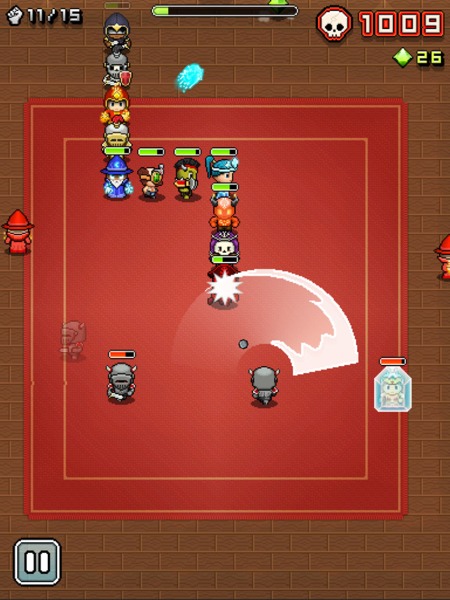
nimble-quest-freemium-0

Selecting a hero to lead the line, from an initial choice of three, you swipe to turn as he or she marches around the map. As you approach enemies your hero opens fire automatically, and if the enemy ‘drops’ a new hero as they die they’re added to your chain when you march over them. The new hero will then be available to select as a leader in your next game, and each hero has their own strengths and weaknesses so you’ll need to experiment to discover which heroes work best in the lead.

As you stomp around the arena enemies with their own unique skills and weapons will attack your heroes whenever they’re in range. Each completed arena showers you with Gems, and completing a previously un-reached arena unlocks a new type of hero and extends the maximum length of your chain. Meanwhile those enemies get stronger and swarm more heavily, and you’ll start learning tactics to protect your lead hero and expose the enemies to the widest variety of attacks, particularly once enemy healers start showing up.

And it does get tough. I reckon most people will really feel the pressure by level 8 or 9, where the swarms of enemy conga-lines seem endless and require constant avoidance. And every time you die, at the hands of an enemy attack or by piling your leader into a wall, an enemy or your own chain of heroes, you have to start back at Level 1 with just one hero in your chain, unless you spend a Token to retry that level.

nimble-quest-freemium-2

This is one of those games where you’re inevitably going to die – it’s just a matter of how soon – but by levelling up your heroes and purchasing power-ups to take in with you, your team will get further and further each time. Every death is an opportunity to tweak the team, pick a new leader and head back in for more and in that respect it’s quite similar to a ‘Rogue-like’, a style of adventure game that’s never the same twice and is designed to be played over and over.

Experience is only earned by the hero playing Leader, although the skills they learn are used no matter where in the chain they appear. Levelling up can also be bought with Gems which are reasonably plentiful within the game but, again, also available to purchase as IAPs. So although certain heroes are not ideally suited to the lead position (too slow, too lightly armoured), it’s worth levelling them all up at least once as soon as possible as the extra power they bring starts to pay off in those later arenas that once proved too much for your merry gang.

This time it’s The Real Thing

All in all, it’s a solid package, and for me it’s NimbleBit’s best yet as it’s quite simply a Proper Game. I’ve played their last three games and while each was an improvement over the predecessor, none of them have been particularly ‘gamey’ if you looked too closely:

  • Pocket Frogs was diverting for a few moments but ultimately I just didn’t care about collecting pretend frogs that didn’t do anything besides cross-breed at your whim;
  • Tiny Tower was delightfully charming in its presentation with a lot to occupy your prods and pokes, but before long it boiled down to the same old freemium pay-indefinitely-to-remove-ridiculous-timers mechanic with not a whole lot else going on in those cute little tower blocks;
  • Pocket Planes added a considerable dollop of strategy and medium-term purpose to the same mechanic, but over time its lack of a single over-reaching goal made me start to feel I was wasting my life on it for no real reason, as compelling as the desire to build the next biggest airplane was; read my review of Pocket planes here.

But Nimble Quest replaces the ‘gotta catch ’em all’ mechanic the last three favoured with a traditional score-based gaming model – level up, get further, score higher – and an online mode in which you can join clans and compete in daily challenges to win prizes and power-ups (try #TOUCHARCADE to join readers of the popular iOS games forum).

This simple fact – it’s a Proper Game – is why it’s still on my iPad despite the currency-based IAPs lurking in the background.

One more play! Next time I won’t double-turn back in on my own heroes, and I’ll definitely get to the next level! Argh, dead again, next time I’ll use a stronger hero at the front… one… more… play…

So, about those IAPs

I read a thread in the SomethingAwful forums in which it’s claimed you could fully level up a hero from zero stars to three stars in around 20 games with that hero in the lead. I suspect that might be a conservative figure; the first star can definitely be earned with just a few games in the lead, but the next requires a hell of a lot more EXP – I played three games in a row to Arena 9 with a one-star hero and the EXP bar increased by less than a tenth. And there’s at least a dozen heroes to unlock and level up.

nimble-quest-freemium-1

So the alternative is to buy the next level in Gems, and although the price for the first star is highly affordable you should probably try and save that cash for later as buying the second star costs around 10,000 Gems.

Without IAPs I was collecting about 1,500 Gems getting as far as Arena 9, so that’s six or seven good runs per hero to get their second star, and of course the price drops a little as they earn EXP. However, your third star will set you back a lot more and bear in mind you can also spend Gems on upgrades to the various power-ups that drop so that’s going to eat into your ol’ bank balance there, and so eventually you begin to think about considering looking at those IAPs…

But a freemium game always has two currencies, and Nimble Quest’s second is the Token. These drop very rarely, maybe once or twice every five or six arenas. They’re used to purchase power-ups that last your entire next game, to retry arenas when you die, add random heroes to your conga-line before the next arena, that sort of thing. Usually the cost is just one Token, but repeated retries of the same arena cost double the last amount, so be careful.

You start with ten Tokens and by not going nuts on retries unless I was on a particularly good run, making only occasional use of the health and attack-speed power-up purchases, and keeping my eyes peeled for Tokens in-game I’m still not quite out of stock, but I really have to think carefully before spending one as they’re too infrequent.

nimble-quest-freemium-IAPs

So what’s on offer in the IAP screen? You can buy packs of just Gems, just Tokens, or a mixture of both, and the tariffs within each category are a little odd, at 99¢, $4.99 and then a huge leap up to $19.99.

For my money if you were going to get an IAP the $4.99 mixed pack offers 180,000 Gems and 120 Tokens which should easily be enough to put together a nice strong line-up of heroes with plenty of retries and power-up options, making progress much less of a grind.

Alternatively, or additionally, there’s a one-time unlock of Red Gems which offer ten times the value of a standard Green Gem (or twice the value of a Blue). This gives your Gem balance after each run a considerable boost making it much easier to level your characters by paying, and doesn’t leave you with that unpleasant wallet-gouging sensation when your purchased Gems and Tokens inevitably run out.

There’s no denying that like all the most hateful most traditional freemium games, the mechanics have been skewed against the player so they’ll consider an IAP sooner rather than later. The question is to what extent it bothers you in this particular game.

There’s none of the annoying timers that plague Real Racing 3, The Blockheads, and other could-have-been-great games that decided it would be a Really Good Idea to perpetually annoy their players – instead Nimble Quest freely hands out the currency in-game but is, shall we say economical with it, making it a question of how much time you want to spend replaying the early arenas until you’re strong enough to progress, as opposed to how long you’re prepared to do something else entirely while a timer counts down.

And now, a short rant about freemium

The only freemium I don’t have any problem with is the kind that gives away part of the game – the first 3 arenas, for example – and puts the rest behind an IAP that reflects a decent one-time price for the game. But even so, Nimble Quest hands out enough Gems and Tokens that with some skill and persistence most people could probably get more than enough fun out of the game for the ridiculous asking price of FREE and have nothing to complain about, and a purchase of $4.99, a fair price for a casual game of this quality, would unlock enough Gems and Tokens that they could feasibly tire of the game itself before they spend them all.

The problem I have is, I am one of those weird, rare App Store users who doesn’t have a problem paying a fair, single price for a good app. I want to support the developer, but I hate the notion that I’m buying an expendable, entirely arbitrary ‘resource’ that I’ll have to keep buying if I enjoy and want to keep playing the game, which is why the only purchase I’ve made is the Red Gem unlock, and yet I still feel I’m being driven towards the IAPs as it’s still a grind.

nimble-quest-freemium-4

If NimbleBit make the currency drops too frequent they won’t make any money from their only income stream, IAPs, and be left in a similar position to the developers of the beleaguered Punch Quest, a freemium game which also included currency and power-up IAPs but gave so much currency away in-game that barely anybody bought the IAPs and it nearly killed their company.

Then again, that’s the whole point of freemium, that most people will put up with the arbitrary frustrations, but a small percentage (known as ‘whales’) will pour enough money into the IAPs that the developer makes enough income to cover all of the freeloaders. By making the app free that small percentage can easily swell to a significant number as free apps attract an exponentially higher number of downloads. To take just one example, read this Gamesbrief article from 2010 to see how well IAPs performed in NimbleBit’s own Pocket Frogs, or this PocketGamer article from 2012 that looks at how much money high-priced IAPs can bring in for a developer.

Unfortunately, thanks to the race-to-the-bottom pricing which was, I believe, originally driven by the poor discoverability on the App Store which meant that getting onto the Top 50 charts was the only sure-fire way to get decent exposure on the App Store, there is now a mass-market expectation of low prices, and ideally no price, and a fascinating seam of outrage is always bubbling up somewhere on the internet over the ‘greed’ of developers asking more than a dollar for their hard work. It is to this culture of expectation that we owe the freemium phenomenon’s current prominence on the App Store.

(I originally wrote "the freemium phenomenon’s undeniable success of the App Store" but I realised that really, it isn’t much of a success objectively-speaking; customers demand free, which isn’t sustainable, so developers are forced to sustain free by adding IAPs, which necessitates the arbitrary breaking of their game in order to annoy enough people to pay to remove the annoyance, while the casual market continue to freeload; the high downloads and statistical likelihood of netting a few whales sustains the belief that freemium is the way to go, which leads wankers at EA to say things like "the market has spoken and it loves freemium" when in fact the market is these days left with little choice but freemium.

But I digress…)

However, Nimble Quest has two things in its favour in the freemium argument: that grinding for Gems by just playing the game is a fairly effortless task insofar as, well, that’s the game, and it’s therefore far less of a chore than, say, hunting for time crystals in the Blockheads; also, the offer of the one-time Red Gem unlock to permanently boost your Gem gathering. These make the optional packages of currency less of a slap in the face for someone enjoying the game, plus, the price of that Red Gem unlock ($4.99) is very fair if it’s the only thing you buy. If you’re enjoying the game I think you’ll want it anyway.

Play on all your Apple devices, sync on none

Nimble Quest is on the Mac App Store as well as the iPhone and iPad, and it plays well on all three. It’s the perfect iPhone game in much the same way as Snake was the perfect Nokia game 20 years ago, but the screen is a little small so you often obscure a bit of the action with your swipes.

On the iPad it’s a delight as there’s much more space to swipe around, and while it’s not the sort of thing I tend to play on my Mac, it’s exactly the same game assigned to the arrow keys, giving that little bit more precision to the controls if you want that.

nimble-quest-freemium-mac

But thanks to the unreliability of iCloud, NimbleBit haven’t added any form of save-game syncing or backup between different versions. That means if you spend the day on your iPhone heroes but get home and want to pick up on your iPad from where you left off on the iPhone, you can’t – your iPad heroes live completely separate lives, as do your Mac heroes.

In a SomethingAwful forum thread a chap called empiremonkey who appears to work at NimbleBit posted in response to a question about device syncing:

Sorry but nope. Our experience with iCloud was interesting and we are not ready to try it again.

And when asked if other services like Dropbox could be used instead:

… once you get into requiring the player to turn it on or popup a 3rd party login screen the uptake will drop off dramatically and you can actually push people away from the game. That and if someone only uses a service with your games and actually signs up with it in your game you now become the expected place of support for everything about that service including all login issues.

Over at the Touch Arcade forums, NimbleTim from NimbleBit posted the following:

iCloud support in Pocket Planes was an interesting experience. Because of that we don’t have plans to support it in Nimble Quest right now. However I will not say it is off the table permanently.

iCloud’s notorious unreliability has been a recent bone of contention in the iOS and Mac development community but if the only option available for save-game syncing doesn’t work reliably, it’s hardly NimbleBit’s fault. I started on the iPad and put a lot of time in on it before realising my iPhone would start over, which is a shame as it’s a perfect iPhone game, but I don’t have time to waste grinding two sets of heroes up to scratch.

In conclusion

Nimble Quest is a freemium game done about as affordably as you could hope for in the era of hateful timer-based freemium ‘games’, although that doesn’t change the fact that the Gem and Token drops have been arbitrarily crippled to drive as many people as possible to purchase expendable IAPs, which almost ruins the whole thing. If you attempt to avoid paying for currency, which is certainly possible, you’ll probably feel the grind starting to chip away at the fun once you get all your heroes up to One Star.

But it’s still a great twist on a classic game that I had never considered could be refreshed in such an endearing way, and the fact that it’s perfectly possible to play without dropping a cent on the expendable IAPs will probably make it all the more successful in terms of downloads.

If you’re enjoying it, even if you’re against currency-based IAPs like me, consider a one-time purchase of the Red Gems, or the $4.99 Gems & Tokens pack, as that’s the price the game would be worth on it’s own, then get on with playing what’s almost the best Snake game ever.

app-store-availablemac-app-store-availablePick it up from the iOS and Mac App Stores using these handy buttons.

(P.S. I still hate freemium, and would like to urge you all to stop ignoring great games that ask a single, one-time purchase price of more than a couple of dollars!)

Categories
iOS & Mac reviews

Pocket Planes for iOS: a review

What’s this, a game review on my glass eye? Well, I’ve been in a gaming mood lately so I haven’t been ‘making’ much and thought writing a quick review would keep my hand in on the writing front. Also, a fleeting review of this game at Wired has been getting a lot of criticism today but I found it touched on some salient points about the game that I wanted to talk about myself.

Pocket Planes (App Store link, free) comes from Nimblebit, whose last game, Tiny Towers, was set in a charming 8-bit style world and involved populating a skyscraper with shops and ‘bitizens’ to run them, then keeping them stocked and supplied with visitors. As appealing as the presentation was the gameplay boiled down to the busy-work of restocking shelves and delivering bitizens to their desired floor in order to grind coins and bux to buy more stock and increasingly expensive floors. There was barely any strategy or simulation and my interest waned quickly.

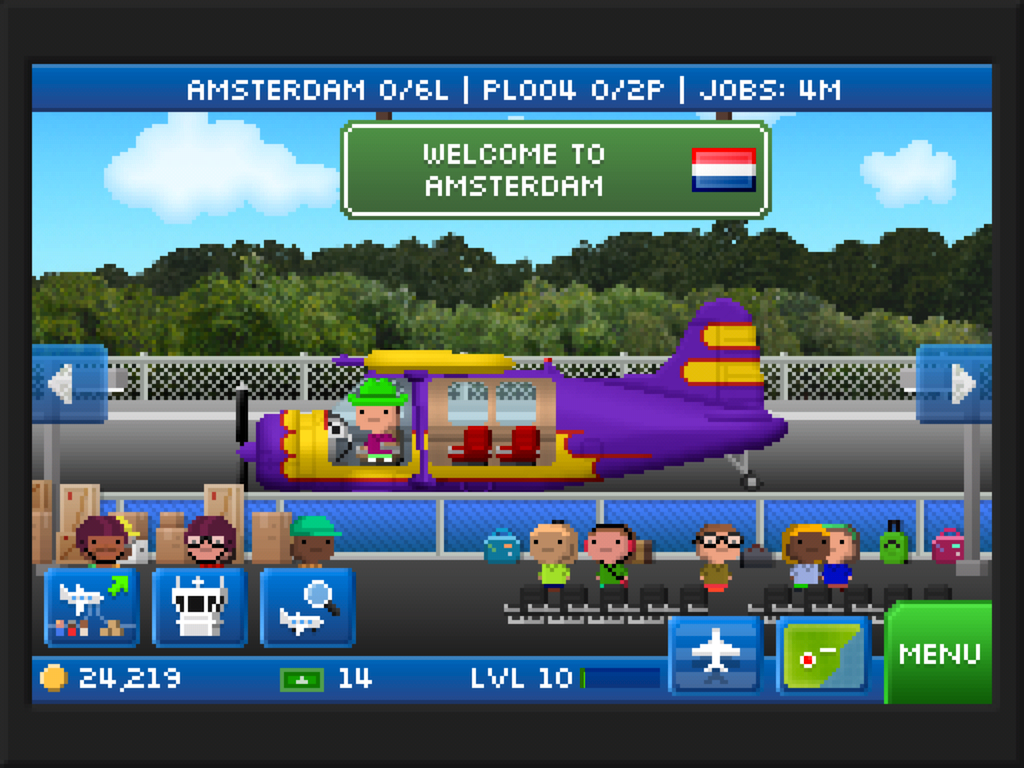
Pocket Planes has a lot more to it, although at first glance you might not notice as you’re still ferrying goods and bitizens to their destination, but this time aboard your very own airline.

Starting in your choice of territory you receive a small fleet of 1- and 2-seater planes and a handful of airports to despatch them to where they can pick up passengers, cargo, or both depending on the plane type. Each job’s fare is proportionate to how far away it is and larger airports have more jobs on offer; the list refreshes every few minutes, as does the marketplace where you can buy new planes either in whole or in part. The planes start small and get huge, with their own range, weight, speed and capacity stats, custom paint options and quirky nicknames inspired by their real-life counterparts.

Once you have your customised fleet up in the air and the cash starts to slowly roll in you’ll want to start expanding. There are two forms of currency to spend on expansion; coins, earned from the majority of flights; and bux, earned from occasional special deliveries and levelling up.

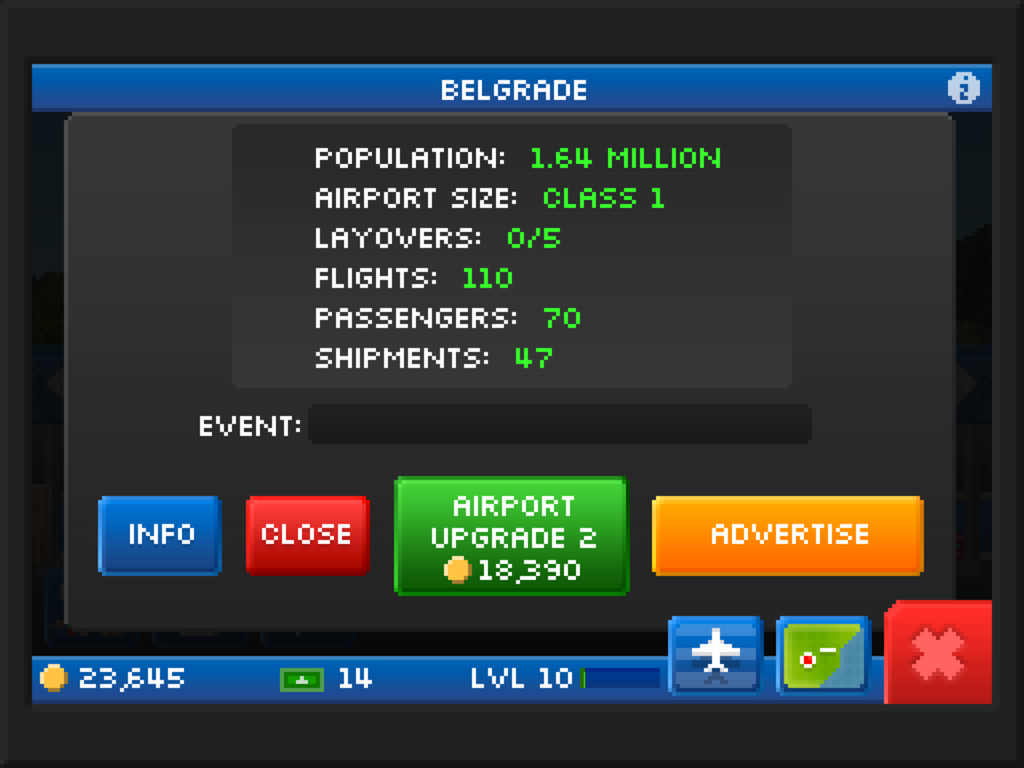
Coins are readily come by assuming your airline is running with even the slightest efficiency and will buy new cities to fly to, extra slots for new planes, airport size upgrades or airport advertising (a rush of jobs at that airport for 8 hours).

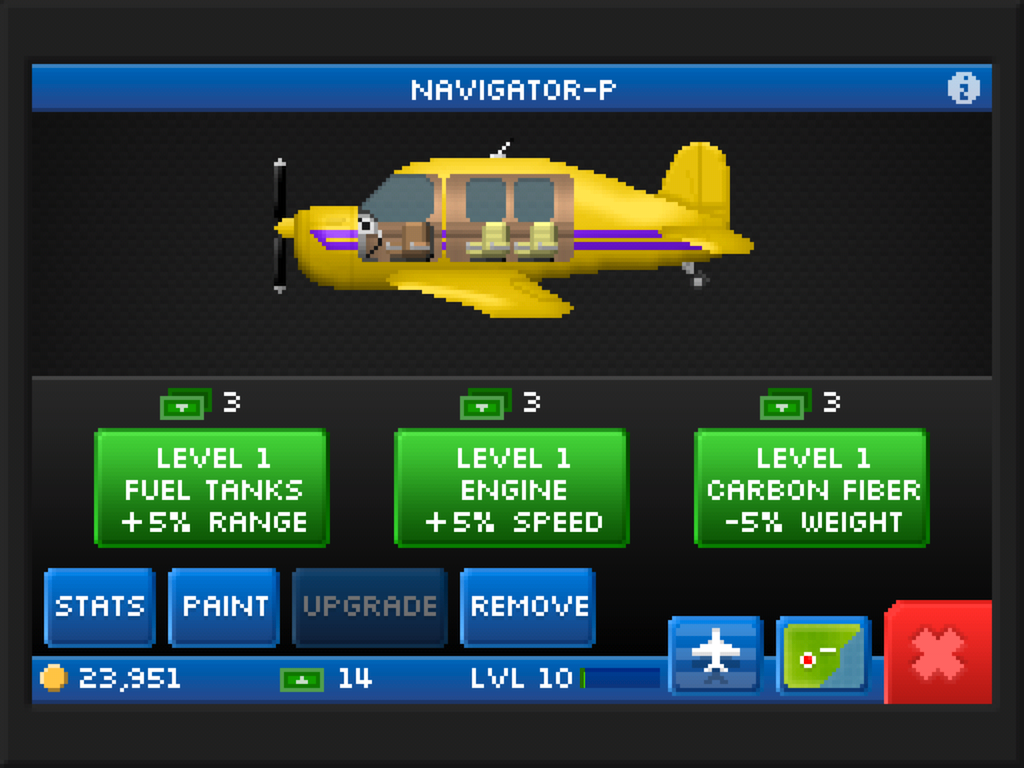
Bux are by far the rarer currency and are spent on new planes or the parts to build your own; hurrying a plane to it’s destination; upgrading a plane’s range, speed or weight; or giving your pilots fun costumes (fly with me and you better hope Elvis took flying lessons).

Finally, fill the Level meter by completing jobs and you get a handful of bux, an increase on the number of airports you can own, and better planes in the marketplace.

Online play is served by Global Events, Flight Crews, and the swapping of spare parts you don’t need (at the cost of one bux). Form or join a crew by entering it’s name on the Flight Crew screen and all jobs you do that are connected to a Global Event go towards a Crew score. The Crew with the highest score at the end of the Global Event period (usually several realtime days each) shares bux and coin rewards amongst them. The events, including the special Global Event that Crews take part in, can take place anywhere in the game world and can offer small bonuses or shut your airports down for period of time. If you haven’t got an airport in that part of the world, you can’t take part or be affected.

Where you go from here is completely down to you but what you’re supposed to do is buy better planes, make more money, and expand your airline across the globe, which brings me to the criticism Wired had, that there’s not much else beyond the ‘despatch planes, earn cash, upgrade, repeat’ cycle. This is not entirely true; in fact, Pocket Planes successfully hides a fair bit of depth and strategy away in the gameplay, but you have to find it for yourself.

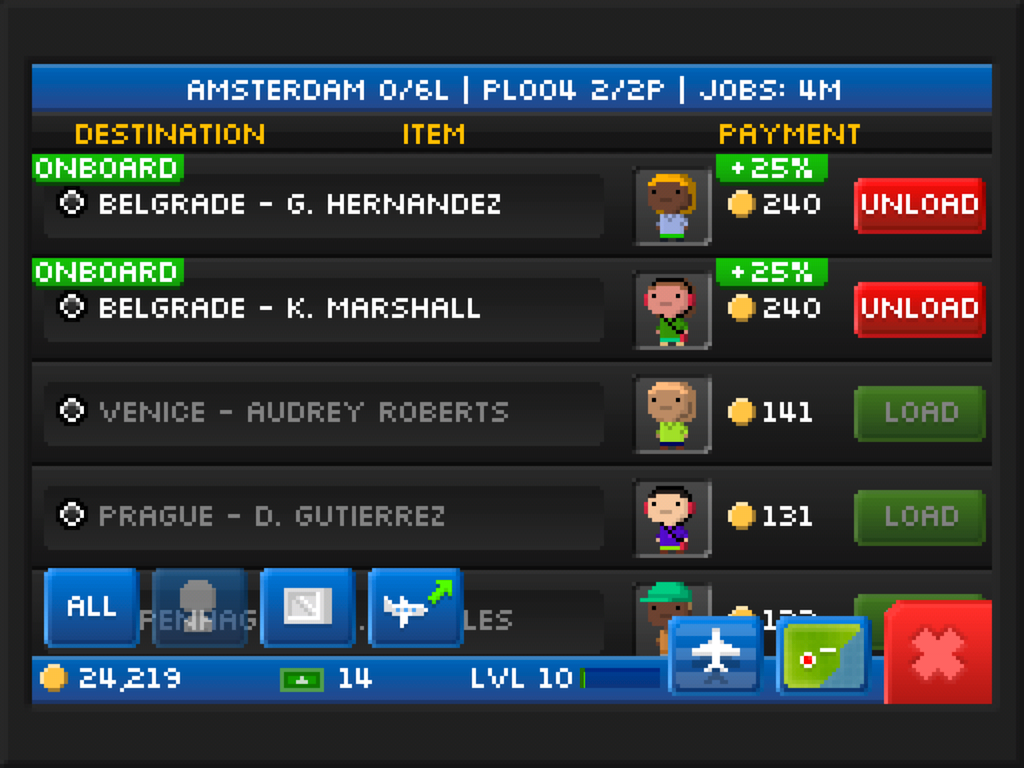
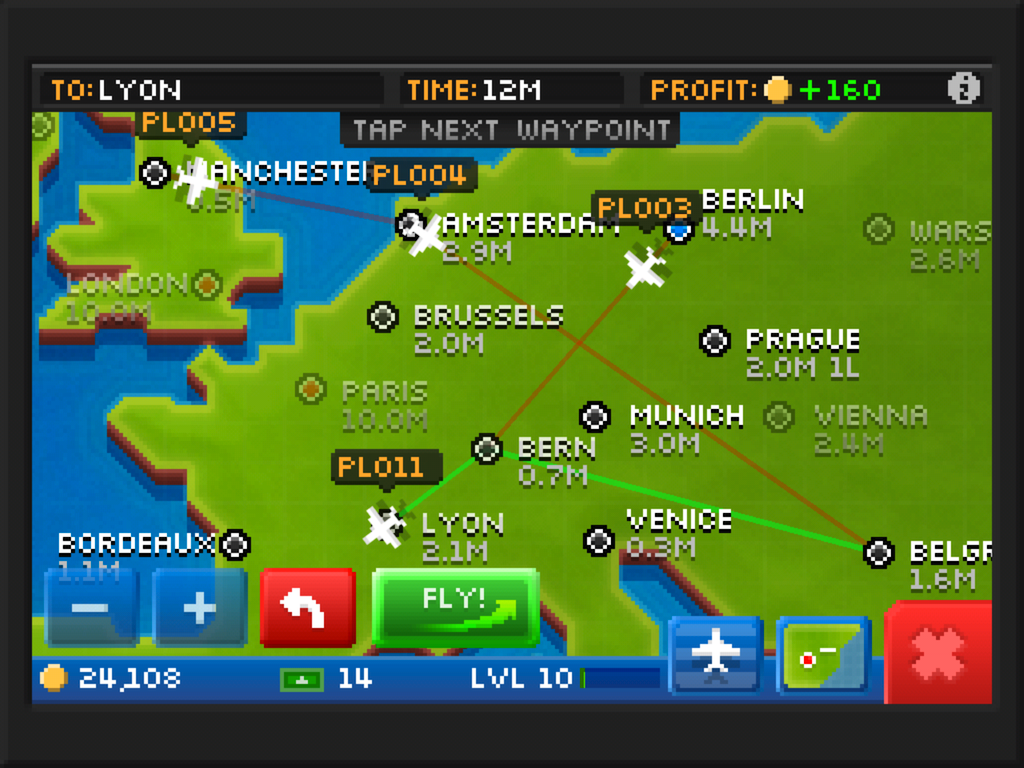
For example: if you choose jobs so that everyone on board is going to the same place you get a 25% bonus on the fare; if you’re not careful with the jobs or flight plan the fuel can cost more than you’re earning, running the business into a money pit early on; with multiple destinations on board you can make the effort to stop at each leg and refill the empty seats, or do the whole thing as one journey which requires less attention at the expense of profits; you could run an inefficient but still-profitable airline flying stuff wherever it needs to go as you find it, or you could be more organised and allocate some 2-seaters to ferry longhaul passengers to a hub city to be picked up by dedicated jumbo jets, while the rest of your fleet make quick cash doing the shorthaul stuff.

Efficient flightpath planning is definitely where the depth lies in Pocket Planes. Your opening strategy will always be to pick up the most valuable cargo at every airport, drop it all off and get some more. However, as your web of destinations widens and the long-distance fares go up, so does fuel cost and the need to strategically balance longhaul with intermediate dropoffs to keep profits up, then evolving that strategy further as you thread your way across the globe.

(This game and Plague Inc. have improved my knowledge of global geography an embarrassing amount.)

But while it’s undoubtedly satisfying to have planned and executed such a strategy, without deeper flightpath management options like you find in such desktop management sims as Railroad Tycoon it can get tricky to keep track of just what you’ve tasked each plane with. This organisational effort is perhaps why a more casual player may never even consider evolving from their initial strategy, dooming themselves to low margins and slow expansion.

However you play it, your interaction with the game for 90% of the time consists of picking jobs and sending the planes up; there are no other gameplay distractions or money-spinners. For example, you can’t invest in businesses at the airports to earn money outside the jobs system, compete with other airlines in-game, research particular technologies to suit your style of play, or task your planes with anything more out of the ordinary than the global ‘Flight Crew’ jobs. And once you start to need 30+ bux per new plane or 50,000 coins for a decent airport the amount of work you need to do to earn it can start to feel more like joyless grinding unless you buy some bux with real money.

But this is critiquing on a high level; I didn’t expect a deep management simulation, especially after Tiny Tower, so to find any sort of emergent depth to the gameplay is an unexpected treat. Three days in and I’m still embarrassingly addicted to ferrying my bitizens around the world while I work towards my next planned expansion. In fact, I’ve enjoyed it so much that I think just on principle it’s worth the £2.99 they’re asking for a healthy 200 bux.

If you’ve skipped to the end, there’s plenty to enjoy in Pocket Planes for anyone that likes casual management and simulation games, but it will probably hold your attention longer if you invest some thought into an efficient strategy for your airline’s expansion. Otherwise, the basic grind might lose you after a few days.