Categories
Featured iOS & Mac how-tos iOS & Mac reviews

How to put two photos side by side in Instagram

instagram collages with DipticWhenever I need to make a photo collage on my iPhone, or put two screenshots side by side for a blog post, I use Diptic (99¢). It’s easy to use with plenty of options and sends your creations to pretty much anywhere you can think of, including, of course, Instagram.

It’s Universal too, and works great on the iPad, or Diptic for Mac (99¢) is also available if you’d prefer to make collages from the comfort of your laptop or desktop Mac.

Check Diptic out on the App Store, or read on for my quick review of how the app works.

Getting started with Diptic

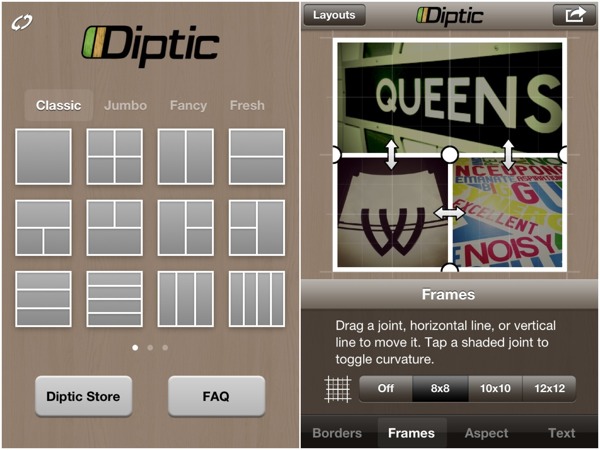
To start making collages, launch Diptic and pick a layout. All the layouts that come with the app produce a square collage, as befits something destined for Instagram, but the range of photo frame shapes and sizes that fit within that square is wide enough to meet most needs, starting simple and getting as fancy as stars in circles – you can even start dragging the frames around to make new shapes that fit your photos.

The frames themselves can be tweaked all sorts of ways, including roundness of corners, colour and thickness, or using a texture. Want your frames to sport a classy zebra-skin effect? No problemo…

instagram-collage-montage-Diptic-1

What if you want a rectangular montage, comprising two square photos side by side for example? Well, then you’d have to purchase an upgrade to unlock an aspect ratio control.

There’s a variety of in-app purchases in Diptic: new sets of layouts, new textures for the frames, and the aspect ratio control. All these are 99¢/69p and none are essential so it’s fair enough, but if you really want to use Diptic for anything aside from Instagram I recommend getting the aspect control as it’s really useful – I used it to put the two screenshots above together as one image.

Adding and editing images

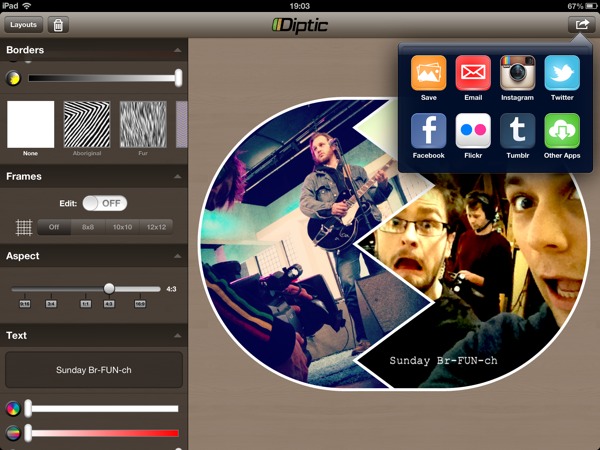
Adding photos to your collage is as easy as shooting them for each frame, or choosing from your Photo Albums, Facebook or Flickr. Once in place there’s a handful of editing options (brightness, contrast, saturation and tint) and a whole range of filters that can be applied to individual snaps, useful if you used the camera in-app to fill a frame. Any blank frames you want to keep can be filled with a colour if you like.

instagram-collage-montage-diptic-2

There’s also some limited options to add text to your photos, offering a variety of fairly standard fonts, outline and drop-shadow effects, rotation and background. It definitely does the job, although if you’re looking for funkier fonts and more options for adding text to iPhone photos take a look at an app called Over (read my review of Over here).

When you’re finished you can save and upload your collage right from the app, to Instagram, Twitter, Facebook, Flickr, Tumblr or Twitter; or export to any compatible apps you have installed. Recent updates have even added the ability to order a postcard and mail it anywhere in the world using Sincerely.com.

diptic-instagram-collage-montage

Plus, it’s Universal so you get the iPad version thrown in. There’s me using it to throw together something a little different with a couple of photos from my day job as a TV camera operator.

In conclusion

Diptic is by far the most popular option for creating photo collages on your iPhone or iPad, with good reason. I keep it installed because of the easy-to-use interface and the flexibility of creating non-square collages, which are good for so many more places than just Instagram. And don’t forget to give the Mac version of Diptic a try too!

app-store-downloadmac-app-store-download
Categories
iOS & Mac reviews Reviews

My updated thoughts on Instagram 2

I used to love Instagram. It had become my favourite iPhone photo app due partly to the ease of sharing to various sites at once but mainly because of it’s lovely filters which struck a good balance between light and heavy effects and had a subtle film-like quality to them at times.

Then it was updated to 2.0 and so many horrible things happened to it at once that I pretty much frickin’ hated it, and boy did I blog about it. In the many months that have passed, I have got over many of my issues with it and started to love it again. It is still flawed, but I love it nonetheless.

(If you fancy, you can check out what I’ve been doing with it at Instagrid, and I’m told that Carousel on the Mac App Store is also very good if you like browsing Instagrams on a desktop computer.)

My original issues with 2.0

If you haven’t already, you may want to read my assessment of the 2.0 update; it’s fairly long but there’s lots of pictures to look at.

Too long, didn’t read? Here’s the bulletpoints:

  • all the filters lost something of their character and in one or two cases became very different (Lord Kelvin particularly); while casual users may not have noticed or cared, as a user who came for the freebie but stayed for the filters, I definitely noticed and cared.
  • much-loved filters were dropped, notably the contrasty B&W Gotham filter. New filters introduced didn’t seem to have much to say for themselves and felt too similar to each other.
  • the tilt-shift tool lost the gradient slider that dictated the abruptness of the blend from sharp to soft, making it a much less satisfying effect to apply

I came to the speculative conclusion that the developers had re-written how the filters were applied in order to speed up the app and allow for a new ‘live preview’ function, and that the new method hadn’t captured the same film-like quality, leaving a more sterile feel overall.

At the same time, it crossed my mind that perhaps another factor was an intention to move away from the sort of look that Hipstamatic has typified and give Instagram a chance to outlive the current craze for over-the-top retro effects.

Either way, I decided to stick with version 1 and not update, but of course in time that proved to be too impractical and a few weeks and a couple of maintenance updates later I reinstalled and, yes, despite my complaints it has gone back to being my favourite photo app. So, I thought it time to post…

My updated thoughts on Instagram 2

I have niggles, but generally I’ve fallen back in love with it. It is back to being my go-to app for snapping a nice moment, and the availability of some less extreme filters contributes significantly to that.

I don’t use the live previews, good as they are; I might miss the moment trying to pick one so I shoot first and choose filters later. Occasionally I forget what that arrowhead bottom-right does so I tap it and up come the previews and I check them out, and they’re pretty cool. Seeing the moving image filtered makes me wish I could record footage with some of them, particularly Amaro.

I like how they’ve listened to users and changed how the filter scrolling works so filters don’t activate when you touch them as you scroll, and the list doesn’t wrap when it gets to the end. The new UI is smart and modern and on the 4S everything is super snappy.

A recent addition that wasn’t in 2.0 is the Lux button; it’s sort of an instant HDR effect, bringing out detail in shadows and highlights. On the downside it can introduce a lot of noise and the effect isn’t always even across the image, but it works as a toggle you can turn on or off at any time while choosing an effect so it’s dead easy to just try it and see if you like it; when it does ‘work’ it can be fantastic.

Another big bonus is how I can essentially post a Twitter update with image attached from the Save screen, so much so that it would be really cool if the app could optionally show you an effective Twitter character count; it’s too easy to type a long description in Instagram that gets cut off when the text and link is posted to Twitter.

As for their own social features, I follow a couple of friends and some people are following me but I don’t often check the Favourites page or keep up with ‘liking’ other people’s images other than friends, so I can’t comment on any bugs in that area; I understand several have crept into older versions of the app.

One thing I will say about the social side; on the rare occasions I dip in I find an awful lot of images that were not taken with the app. That annoys me. I don’t want to see your DSLR-shot HDR image you transferred onto your iPhone and uploaded, whether it’s been treated or not. I just want to see iPhone (and soon Android) images. Perhaps this could be mitigated by somehow encoding ‘100% Instagram’ captures with a tag that users can search for?

What about those filters?

The bulk of the app is the filters, of course, so here’s my big confession: while there’s simply no denying that in comparison to the originals they have lost something and look more sterile, my eye has, in time, gotten used to them. I’m finding increasingly often that I want to use a subtler filter on an image than I might have used in the past as I grow out of the habit of turning everything into a contrasty, super-saturated, fuzzy retro-look snap.

That’s not to say there isn’t a time and a place for that stuff, of course, and sure, sometimes I wish the new look filters didn’t look so damned clear and sharp under the colour layer (particularly Early Bird, which still doesn’t quite capture the mood of the original) but that’s the way they are now and as an alternative to the much-loved skeuomorphism of Hipstamatic, I’ve warmed to it.

A few new filters were added in 2.0 and I originally dismissed them for being too similar and subtle but it turns out that Amaro has become one of my most used filters, alongside other favourites X-Pro, Lo-Fi, Sutro, Brannan and Hefe.

Amaro is not too heavy, not too contrasty, and lends photos a subtle cold blue hazy wash that often summons up a sense of early morning light and imbues images with an indescribable character; there’s just something about it I love. If anything it makes me wish it’s companion filter, Rise, was a little warmer as an alternative.

Only one b&w filter?

What Instagram really lacks right now is black and white options. Black and white is a whole school of photography in itself and is noticeably under-represented in the filters with just one example, Inkwell, which I’ve rarely made a pleasing B&W with. They could fix this just by adding back Gotham, or something like it, a lovely contrasty B&W filter that got the chop in 2.0.

(An aside: I realise you can put a shot through Instagram more than once; you could use Inkwell twice, or follow it with something like Amaro to give it toning, but then you have to deal with something I’ll come to shortly – autosharing every version.)

Resurrect the gradient slider!

Another big disappointment in version 2.0 was the gimping of the tilt-shift tool. As it originally worked you set the size and shape of the sharp area then used a slider to increase or decrease the distance of the transition from sharp to soft. Version 2.0 removed the gradient slider and used a noticeably hard transition as the only setting. It mellowed a little in updates but the gradient slider is gone.

The reasoning, I would guess, is either that it didn’t fit any more, or that simpler is better. Perhaps both? Instagram has been a major success; a recent story at Lies, Damned Lies & Statistics suggests 20-25 million users as of the start of March 2012. Even more recent headlines suggest 27 million, and it’s coming to Android shortly.

Now, one key to reaching and maintaining a mass market of everyday users like that would seem to be a certain user-friendliness (often mistranslated as the removal of options) – Apple knows that only too well. Is that what’s going on here? Or was that gradient slider just not fitting onto the screen in the new design?

I would really like to see it come back. As it is now the tilt-shift can be quite inflexible as a creative tool. Sometimes you want a hard transition; other times you need it to be really subtle (such as creating believable depth of field in a fake tilt-shift). With a very soft feathering setting one could feasibly control the amount of blur in the image. Instagram 1.x gave you the tool to control all this; Instagram 2.x thinks you can’t handle it or don’t need it.

Perhaps the slider and the Gotham filter could stage some sort of comeback event, throw a party, make a it A Retro Thing. Both are sorely missed.

Auto-sharing niggles

Finally, and this really is a small gripe but one I wanted to explore, much as I love the easy sharing to Twitter, Facebook etc (if I want to), there is no easy way of taking a photo in Instagram and not sharing it to their own social network automatically the second you save it.

It’s fairly obvious why this is, of course; the social side is Instagram’s Whole Thing. There’s a reason Instagram is most easily described to newcomers as ‘like Twitter but for photos’ and put in that context, suggesting there’s a switch for turning off automatic publishing to their network seems like a pretty dumb ask. In most respects I agree but I’ll ask anyway because sometimes I really want to turn it off temporarily.

Thing is, I love the app and the pictures I make with it, but sometimes I don’t want to share. Maybe they’re personal family images, or maybe I’m at work on something I can’t talk about publically, or maybe I’m processing a photo several times before it’s ‘final’, or maybe I’m photographing multiple examples of every single letter of the alphabet to make a Christmas card, and I don’t want to spam my followers.

(These are all real examples in my case.)

Yes, I could use Hipstamatic or any of the hundreds of identikit photo apps instead.

Or, I could do that thing where you go into Airplane mode first so the auto-upload fails but the image is saved to your Camera Roll, and then turn Airplane mode off and remove the failed upload from the list.

Or, I could just deal with the fact that this is how the app works, and what their as-yet-unknown business model revolves around, so workarounds it is.

But still, it’s a niggling annoyance and one I’ve had to explain to friends at work who picked up the app after seeing me use it and then discovered they had to share all their pics with the world. Some people don’t want to, at least not all the time.

Maybe the app’s not for them. Or maybe there could be a switch that turns all sharing options off, including Instagram’s, kind of like Airplane Mode for Instagram. Go on. There’s so many people actively participating in the social side that I wonder, would it hurt to grant some of the users some privacy if and when they’d like it?

Not a biggie, though, even though I just wrote nine paragraphs on it and actually stopped to count them twice just so I could write this tenth one.

The bit at the end

Well, that’s my thoughts on Instagram 2 these days; the old filters are dead, long live the new same-but-different filters.

There is too much love in my heart for using Instagram but in the hope that asking nicely will maybe cut some ice at Insta-HQ, pretty please can we have Gotham and the tilt-shift gradient slider back, and how about my cool ‘Airplane Mode for Instagram’ switch, eh? 🙂

Oh, and good luck with the Android launch!

Thanks for reading.

Categories
Editorial Other Photographic

Buying my images as prints, licensing, and all that stuff

I’ve had my images on the web via one site or another for about 7 or 8 years now; I used to use Flickr, then I got my own photoblog, then my own portfolio, then through Photoshelter, then finally I stopped paying the subscription to Flickr. I’ve tried many times to push selling my images as prints, either by using the Fotomoto plugins on my photoblog or advertising them via my websites. I’ve considered signing up to stock agencies but they pay very little and demand a lot of content, which I could shoot if I wanted, but I don’t want to as it would suck every last drop of fun out of photography for me.

In those 7-8 years I can count on one hand the number of people I’ve sold prints to – my biggest sale was to a brewery chain who wanted local images of Putney to use in The Boathouse pub. I get a lot of business from people wanting to commission their own shoots, but practically none wanting to buy a print. However, every so often someone comes by my website from a search for ‘London prints’ or something similar, so I figured I should make it clear to them that I do sell prints and license images, and that with the exception of my movie stills work, nearly every image on this particular site is available to buy as a print.

Simply get in touch, tell me what image you’re thinking of, what sort of size you’d like, where you are based, and I’ll cost it up and quote you a price – my prints are made by Spectrum Photographic and while they are not as cheap as a crappy Snappy Snaps rush job, they are archival quality and worth every penny.

Also, feel free to browse my portfolio; there are less images in there that are available for sale, but you might find things you missed on this site.

Thanks!

Categories
Photographic Pictorial

The Studio of Tristan Versluis

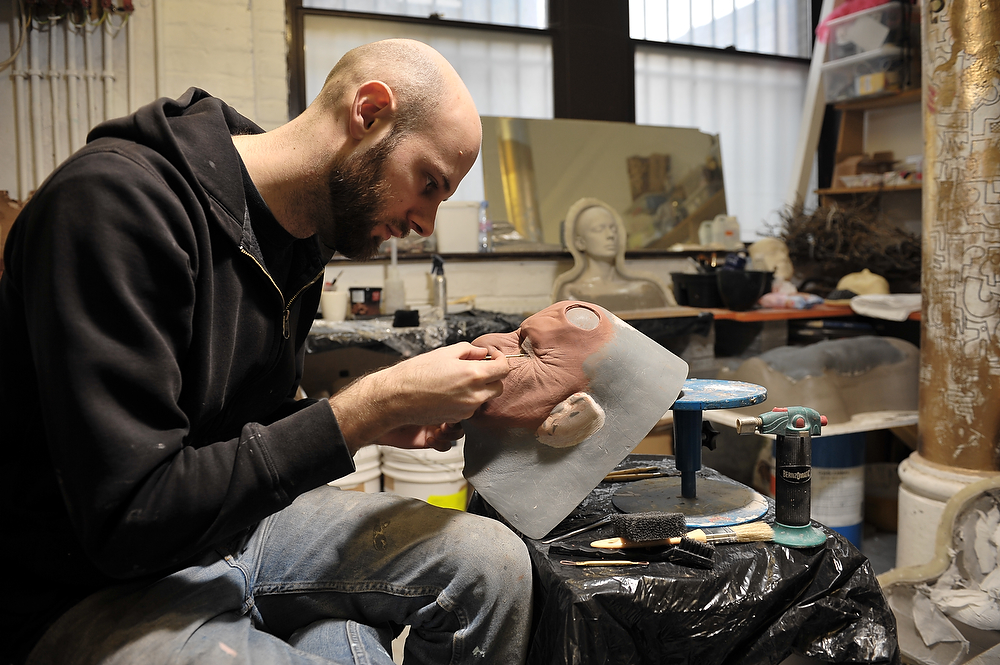
Tristan Versluis, writer, director, special effectsTristan Versluis is a prosthetic special effects artist and also a writer/director of several shorts and a feature (IMDb). I’ve written about him a few times on this site, most recently when I did stills on a night shoot for his latest creation, OMNI, a sci-fi horror about alien visitations.

I was hungry for something a bit different to shoot, and also I needed to break my habit of sitting around playing Skyrim on my days off, so last week I went round to the studio space in Hackney where he works on his prosthetic creations and spent the afternoon shooting him at work on a few projects.

I got to hang out with a mate, get some great shots and practice my lighting all at the same time; pleasingly efficient.

I lit with two Nikon flashes, an SB-600 and an SB-800, fired with the PocketWizard Flex and Mini triggers for Nikon. I understand the principles of lighting my photographs the Strobist way, but I’m still not that fluent in visualising the light I want and how to get it without a lot of trial and error, so I used the time to move lights and settings around a lot while Tristan got on with his work.

(if you’ve ever had doubts about your own ability to light with off-camera flash you should check out David Hobby’s Lighting 101 on his site and banish them immediately)


I wish this was a fully featured ‘How To’ post that showed where and how I set up each light for each shot but to be honest I was moving them around so much and chatting away in between so I completely forgot most of the time. I used a mixture of one and two lights and for pretty much all the shots at least one flash had the Lumiquest Softbox III attached.

The room itself was lit ambiently with fluorescents and some dim daylight. Tristan needed light to work so we left the florries on and I gelled the flashes with 1/4 CTO and found I was getting a good colour with the white balance set to Auto.

Now, on a professional job I’ll shoot RAW and make the effort to find the correct fixed white balance setting at the time as it’s easier to work with in Capture NX 2 than a mysterious wandering Auto. This was just a casual shoot for me and Tris, which is not to say I didn’t care, far from it, but a paycheque wasn’t on the line so I stuck to JPG and what I was getting from the D700’s very accurate AWB.


In the third shot above I had got the Softbox off to camera left providing the bulk of the light, but wasn’t getting any definition on the right. I just wanted a lick of light to separate him and light the shadows on the furthest side of his face, so I took the second flash and blasted it off the white wall in the background. That gave me the fill I needed, and the bright white of the wall contrasts nicely with the curve of the clay that frames Tristan as he works on it.

(You can see the stand the flash is on in the bottom right of the shot.)

Several of the projects Tris has on the go right now are top secret, including an absolutely superb creation for OMNI that I have some amazing shots of but can’t share yet. However, the image on the left below is also for OMNI; it’s a cast of actress Charlotte Hunter’s head which will be used to create a further make-up effect that appears to fuse with her actual flesh.

Up close the level of detail is astonishing; every single pore and blemish is visible and around the eyes it seems like you can actually see the lashes, though of course it’s just your brain playing tricks.

This is just one of several more stages that are required before the final piece is ready. It bears all the imperfections of the original casting – small air bubbles are common. Tristan will now work on this clay mask to iron out all the flaws before proceeding.

Apparently a model’s first reaction on seeing their finished mould is often that it looks like a death mask. Tristan explained that this is down to the way the plant-based moulding gel sets on the original casting; because it has some weight, not a lot but some, there is a slight downward pull on the model’s skin which makes the resulting skin impression appear to have lost some of it’s life, it’s tautness, which a model will notice after a lifetime of seeing themselves in a mirror.

To me, it looked disarmingly like she could open her eyes at any moment.

After a couple of hours of just shooting Tristan getting on with the various things he had on the go, we decided to set up some standard portraits so I sat him in the middle of the room and let him continue tinkering while I set the lights for it. First I set up the ambient exposure because I knew I wanted these to be much more flash-lit than anything else. Then I placed a Lumiquest Softbox III flash camera-right, well over head height, tilting down towards the scene, and a bare flash on camera left at shoulder height.


At first I was getting light filling in the shadows on his face camera-left, but that black top was soaking up all the light, there was no shape, so I shifted the flash until it was grazing past his shoulder in a way that gave me shape in the folds of the sleeve. As you can see I’m still losing everything to the darkness of his top on the right, so maybe I should have gone bare flash on both sides. I’m always scared of using 100% bare flash in a shot though, as if only soft light is good light. Hmm, something to remember for next time!

Still, we definitely got the basic portrait shot we wanted so we tried a few other things. First up, placing a Softbox’d flash either side of his face very close with the rest of the room shut down to black, always fun.


It’s a cool look, and you can increase or decrease the strength of the stripe of shadow by moving the flashes around to the front or back. Next time I’d like to try it with bare flashes, a colder colour temperature and a bit more space in the room (even with aperture closed down, ISO at 100, flashes on lowest power, there’s still some light splashing on the gold pillar and back wall).

Finally, we went for something a little more demonic and did some classic up-lighting with the Softbox’d flash held in his lap pointing up into his face. It was cool but the top of his head disappeared into the darkness so I tried a few with the second flash directly behind his neck firing straight at him but the rim light it created wasn’t enough. However, a few feet over his head and pointing back down at him did the trick.

Check out the inadvertent Richard D. James/Aphex Twin impersonation bottom right.


And that’s everything I have to show you that I’m allowed to show you! Once his creation for OMNI is finished I’m hopefully going to get to photograph it properly, perhaps for the poster. Until then you’ll have to see if you can spot where I’ve carefully obscured it or cropped it out of the shots above…

Cheers for visiting!

Categories
Apple Editorial Other

The astonishing entitlement issues of (some) App Store customers

This week Tapbots released a long-awaited iPad version of what is easily my favourite iOS Twitter client ever, Tweetbot. I haven’t yet tried it because I’ve been trying to limit my access to Twitter to just one device so that it’s effectiveness as a time-waster and a distraction is somewhat mitigated, but I suspect I’ll buckle shortly because I just love using Tweetbot.

They have put it on the App Store as a standalone iPad app for $2.99, same price as Tweetbot for iPhone. It is not a Universal update; if you have the iPhone version and want the iPad version, you need to buy it.

This seems absolutely fair to me and to many other people around the world, all of whom are eagerly putting their cash down for a bespoke iPad version of one of the top iOS Twitter clients. Unfortunately, there exists a group of people for whom a $3 purchase when they already bought the iPhone version is just offensive, and they’ve taken to Twitter to express their disgust that Tapbots are trying to scam them, nickel-and-dime them, extort them out of 299 cents.

How incredibly childish

There’s plenty of people expressing their own opinions of these whiners. A couple of choice tweets that are pushing through to the top of the pile are these from Matt Gemmell and Chris Herbert:

Matt Gemmell:

Tweetbot for iPad isn’t universal. I have to pay TWICE and am ANGRY. Also I am INEXPLICABLY POOR despite having both an IPAD and IPHONE.
(link)

Chris Herbert:

Tweetbot is ‘Universal’, spend $6 and it works on the iPhone, iPod touch and iPad; now quit complaining.
(link)

Now, there are a few apps that have standalone iPad versions where I feel a little aggrieved paying for the iPad version, especially if they charge significantly more than the iPhone version, because all it seems they’ve done is up-scale the graphics without any re-designing to make better use of the larger screen space.

Fieldrunners was an early app that eschewed a Universal version and charged a fair bit more than the iPhone version without any immediately obvious re-design. Fieldrunners HD seemed to be all but identical to running the iPhone version pixel-doubled on the iPad, but with less blocky graphics. I realise that producing higher res graphics takes time, but I didn’t feel there was much value in the iPad version so I simply didn’t buy it.

I didn’t go bitching on the internet about how I was entitled to a free iPad version, though.

Similarly, there are plenty of apps that have graciously offered Universal updates at no extra cost at all – if you have the iPhone version already, the iPad version is essentially free to you. This is very generous and while it’s something to hope for we should have no expectation of this happening; I often wonder how much money might be lost by a developer who puts a specific iPad version into a Universal update.

On the other hand, maybe developers are considering the pricing culture that has sprung up and are more afraid of alienating potential customers by daring to charge separately for the iPad version.

In Tapbots’ case, they’ve crafted what looks to be a superb iPad Twitter client that makes use of the extra screen space. It is not simply a pixel-doubled version of their iPhone app. They deserve to be paid and there is nowhere that I can think of except the App Store where customers of one version of a product would expect to get a new version designed for entirely different hardware for free.

Bellowing into a gaping chasm of indifference

The above phrase is an apt description of the futility of engaging with people on the internet who have differing opinions to your own, unless you’re already friends or colleagues with some modicum of respect for each other.

Nevertheless I had a wee look through Twitter to see for myself what people were really saying and the entitlement is just incredible. I’d link to choice examples but it would probably be easier for you to go to Twitter and search for ‘tweetbot universal’ and scroll through the hits.

(the link will take you to realtime search results which may not be relevant if you’re reading this in the future!).

Despite being well aware of the futility of internet arguments, I did engage with around 6-10 such tweeters, asking why they felt entitled to a free Universal update, or why the developer shouldn’t charge for their work. I tried to keep my tone as non-aggressive as possible but who knows how they were read by the recipients.

Most people engaged me without resorting to snark or insults (proving, unscientifically, that how you word something is crucial to how it is received); many defended their position, frustratingly, although one chap (@rakhmad) completely rethought his opinion when I tweeted that I thought developers deserved to be paid for their hard work, acknowledging that put like that yes, they should be.

But of course there’s always one guy who considers an unsolicited challenge to his opinion to be nothing short of abuse, and responds in kind. Today, that guy was @OmniChinChilla. Mr Chilla says that he hates:

…apps that don’t make a universal one so they can charge you double. Guess I won’t be getting @tweetbot, oh well. (link)

I asked him why he hates developers that want to be paid for months of work, to which his response was not to answer my question but to query how I knew how long it had taken. I explained that I’d read allusions to this app being in development months ago and it was a poorly kept secret in the iOS development community.

At this point, Mr Chilla decided the best way to explain or defend his point was to not explain or defend it, but to bombard me accusations of spamming, trolling, and being a cry baby. Sadly I was unable to continue a civilised discussion with him as I was distracted by my ACME Irono-meter disintegrating in my pocket as the needle rocketed off the scale…

The fact that the majority I tweeted stood by their opinion was disappointing although not surprising, but one chap I got talking to, Marc Schlüpmann (@schlupmann), went a little further. Marc believes that the App Store Guidelines must be changed so that apps with an iPhone and iPad version must be Universal, and must not be charged extra for. I suggested that an iPad version took development time that costs money, and it is reasonable for Tapbots to charge for that.

sure it is the decision of @tweetbot, but the idea is different and I would welcome a change in the App Review Guidelines
(link)

I asked if he meant a change in the App Store rules to force Universal apps.

Yes, exactly that rule: iPad/iPhone apps with the same service must be universal. Because: To get rid of all this * HD apps
(link)

As I mentioned above, it’s true that a customer may feel some ‘HD’ apps don’t deserve the asking price, but preventing developers from setting their own price is not an acceptable practice.

Marc pointed to how Apple charge for a service once, not per machine. I guess he’s thinking of something like iCloud where you pay once and use it on every Apple device you own that is signed into that account. And of course it’s true that purchasing an app from any Apple App Store lets you install it on multiple devices after purchasing once.

I don’t think that’s relevant to this though. A third party Twitter client is not a service. And an app downloaded once and then available to all other similar devices running that OS is still just one app. That some developers are unprecedentedly generous in creating Universal apps that you buy once and run on two different classes of device does not mean that all developers should charge similarly, no matter how great it is for our wallets.

Remember, you’re already getting updates to these apps for free, and coming to expect those to be eternally forthcoming as well. And despite a long history in the Mac/PC software world of free point releases but paid major version releases, because Apple still doesn’t provide paid update functionality in the App Store, some developers that entirely overhaul their apps for a major update are forced to release them as new paid apps, and boy does that start an internet shitstorm.

All this expectation and entitlement, we have no right to it.

If you begrudge a developer charging for working on an iPad version then your best option is not to buy it and instead just run the iPhone version pixel-doubled. After all, it’s the same app. What’s that, the iPhone UI is clunky and weird-looking when you pixel-double on the iPad? But… it’s the same app, so what’s the problem? Perhaps an iPad-focussed design is worth something to you after all.

What other options did Tapbots have?

As it happens, Tapbots have always said that an iPad version of Tweetbot would not be Universal (kudos, Federico Viticci at macstories.net), so all this stupid whining is rather impotent. But just for argument’s sake, let’s look at the pricing options open to a developer with a $2.99 iPhone app that they’ve redesigned for the iPad:

  1. Release an iPad version as a Universal update and keep the price the same; this would appeal to more potential new customers, but would mean that every time someone with the existing iPhone version installed it on their iPad (or vice versa), the developer would not get paid for their work creating the second version. Furthermore, if the original iPhone version has been out for a long time as Tweetbot has, a free Universal update represents a fairly significant loss of deserved earnings as those users with both devices install the app to their iPad for free.
  2. Release as a Universal update and pump up the price to, say, $6; a fair few people complaining about the lack of Universal are asking why this option wasn’t chosen, as if buying one app for $6 is somehow less offensive to them than buying either app for $3 each or both for $6. However, this would effectively punish all those new customers who have only one device as they are being made to pay double what everyone so far has paid for their own iPhone-only version. The developers of the iOS version of Carcassonne (which is great, by the way) did exactly this when they released the iPhone version first, but they always made it clear that when the iPad version was ready the app would go Universal and the price would double.
  3. Release a Universal version for $6 (or whatever), as well as an iPad only version for $2.99 alongside the existing iPhone only version for $2.99; on paper you might think this would satisfy everyone, but I think it would just cause confusion as there would be two Tweetbot apps listed in both iPhone and iPad App Stores (the device specific version at $3, and the Universal at twice the price). Can you imagine how many people will buy the wrong one and then demand a refund or accuse Tapbots of confusing them? I believe there’s a lot more people that would make this mistake than you might think.
  4. Release an iPad-only version at $2.99, alongside the existing iPhone version (also $2.99); this is the least confusing way of doing it that allows them to charge seperately for the new app and also gives customers the choice of which version to buy – the iPhone version, the iPad version, or both (the ‘Universal’ option). Finally, by not hiking up the cost of the iPad version they’re being rather generous with the pricing where other developers have charged more.

First world problems

There will always be people who expect an iPad version of an iPhone app they’ve already bought to be free. It’s no leap to say this situation has arisen almost entirely because of the race-to-the-bottom pricing culture that the App Store has inadvertently created in just a few years. But Apple doesn’t drive this culture. They made a wide range of pricing tiers available but it’s developer who are dropping prices lower and lower and that has led to wholly unrealistic expectations in the minds of App Store customers.

I would just echo Matt Gemmell’s perfect tweet from above: if you bought an iPad and an iPhone, what the fuck are you doing complaining about spending $3 on a newly-developed iPad version of a world class app that you really, really want?

Please, support developers who make stuff you like by paying them the asking price for it. And if you’re really so desperately skint, maybe just don’t have that Starbucks today instead?